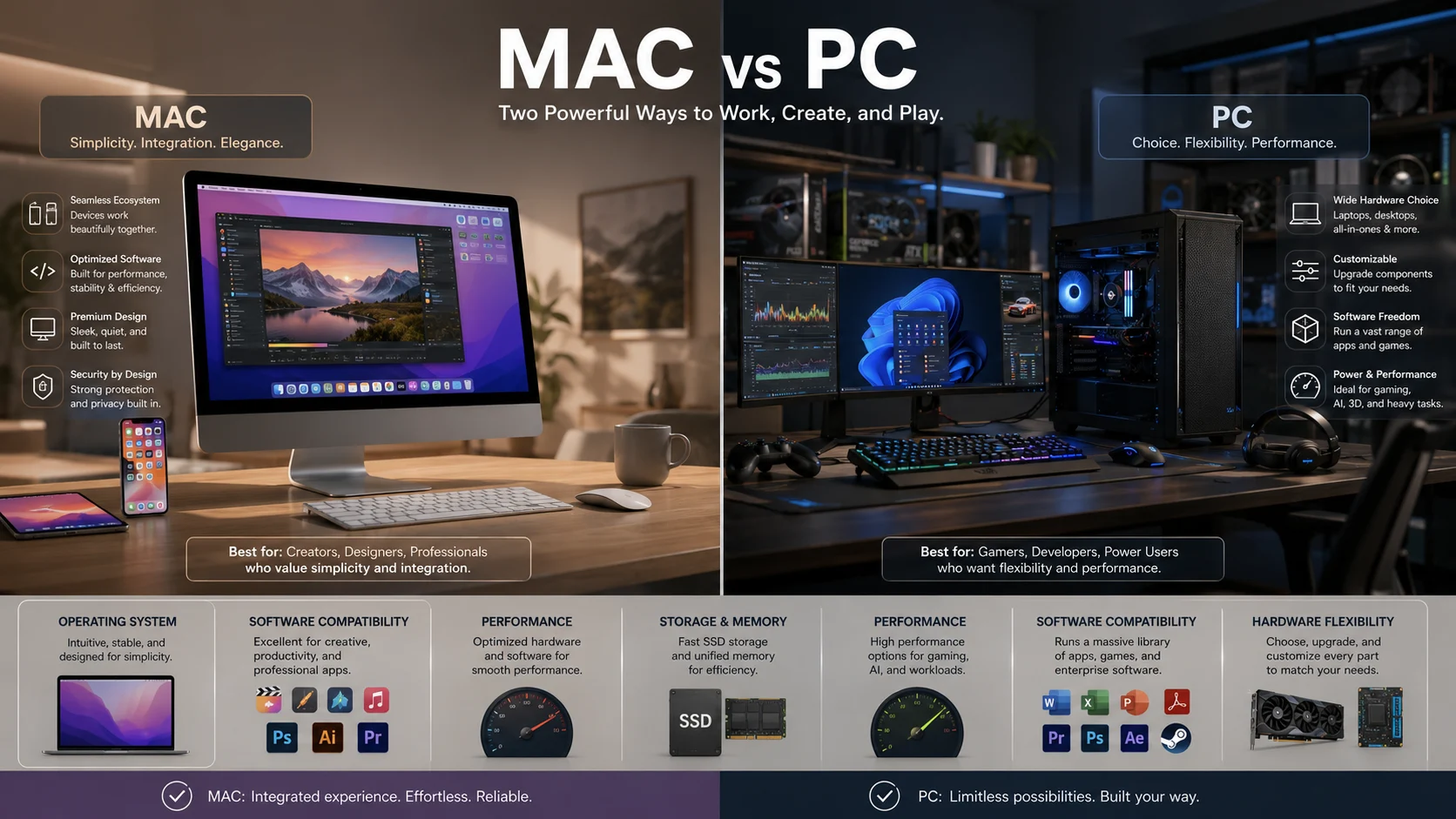
Mac or PC refers to two major approaches to personal computing. A Mac is an Apple computer running macOS, while a PC usually means a computer running Windows. The right choice depends on software needs, gaming, budget, hardware flexibility, security, creative work and how well the computer fits your existing devices.
Choosing between a Mac or PC can look simple until you compare the details. Both can handle everyday work, study, browsing, communication, creative projects, and modern artificial intelligence tools, but they differ significantly in operating systems, hardware choices, software availability, gaming support, customization, and ecosystem integration.
The confusion often causes real mistakes. Someone who buys a Mac for software that only works properly on Windows may face compatibility problems. A student who chooses a powerful gaming PC for simple academic work may spend more money and deal with complexity they never needed. The smartest decision isn’t about which platform is universally better. It’s about which platform matches the way you actually use a computer.
Mac or PC | What’s the Difference?
The terms Mac and PC describe different things, although their everyday meanings overlap.
Mac is a noun used for an Apple personal computer. Modern Macs run macOS and include products such as MacBook Air, MacBook Pro, iMac, Mac mini, and Mac Studio.
PC is an abbreviation for personal computer. Technically, a Mac is also a personal computer. However, in everyday technology discussions, PC usually refers to a Windows computer made by companies such as Dell, HP, Lenovo, ASUS, Acer, or Microsoft.
| Feature | Mac | PC |
|---|---|---|
| Main operating system | macOS | Usually Windows |
| Hardware maker | Apple | Many manufacturers |
| Customization | More controlled | Generally more flexible |
| Gaming | Improving but more limited | Excellent game compatibility |
| Software | Strong creative and professional selection | Extremely broad software selection |
| Hardware choices | Limited to Apple models | Very wide range |
| Ecosystem | Excellent with Apple devices | Strong compatibility across many brands |
| Price range | Generally starts higher | Very broad |
| Upgrades | Limited on modern Macs | Depends on the model |
| Business compatibility | Strong | Excellent |
| Student use | Excellent for many students | Excellent for broad compatibility |
| AI support | Strong and rapidly developing | Strong, especially on compatible Windows hardware |
The important point is that neither platform wins every category.
Mac provides a tightly integrated hardware and software experience, particularly for people already using Apple devices. Apple highlights features such as Handoff, Universal Clipboard, Continuity Camera, iPhone Mirroring, and direct communication between Mac and iPhone.
PC offers much greater variety. Microsoft describes a broad Windows computer market that includes traditional laptops, powerful gaming computers, flexible two in one devices, and different hardware configurations.
In short, Mac emphasizes integration and controlled hardware choices, while PC emphasizes variety, compatibility, customization, and hardware flexibility.
Is Mac or PC a Grammar, Vocabulary or Usage Issue?
Mac or PC is primarily a vocabulary and technology usage question, not a grammar problem.
The words aren’t interchangeable in everyday technology discussions. Saying “I bought a Mac” identifies an Apple computer. Saying “I bought a PC” generally tells the listener that you bought a computer that is not a Mac, usually a Windows computer.
There is one important technical detail. PC means personal computer, so a Mac can technically be classified as a personal computer. The distinction comes from common modern usage rather than strict dictionary logic.
In casual conversation, people commonly say:
“I use a Mac for design.”
“I use a PC for gaming.”
In academic or professional writing, it’s better to be more precise when the operating system matters. Instead of saying “PC software,” you might say “Windows software” if Windows compatibility is specifically relevant.
This distinction matters because a computer’s operating system affects applications, drivers, security tools, games, accessories, development environments, and organizational systems.
When Should You Choose a Mac?
A Mac can be an excellent choice if you value simplicity, battery life, creative software, consistent hardware quality, and integration with other Apple devices.
For workplace use, Macs are popular in creative agencies, media organizations, software development environments, education, and professional services. They can handle documents, spreadsheets, presentations, video calls, web applications, programming, photo editing, and video production.
For example, a designer might choose a Mac because the hardware, display quality, operating system, and creative applications fit naturally into the workflow.
For academic work, a Mac can be particularly convenient for students who need writing tools, research applications, presentations, programming environments, communication apps, and reliable everyday performance. However, students should check their university requirements before buying one. Certain specialized engineering, scientific, accounting, or business applications may have stronger Windows support.
For technology work, Macs are especially relevant to developers working with Unix based tools, web development environments, programming languages, containers, and Apple platform development. Apple also allows compatible iPhone and iPad applications to run on Macs with Apple silicon, which strengthens the relationship between its software platforms.
Mac Usage Recap
Choose a Mac when you value a controlled hardware experience, strong creative workflows, excellent Apple ecosystem integration, and a polished operating system.
A Mac is especially attractive if you already own an iPhone or other Apple devices. Apple’s Continuity features allow activities such as calls, messages, copying and pasting between devices, document handoff, and iPhone interaction from a Mac.
When Should You Choose a PC?
A PC is usually the more flexible choice when software compatibility, gaming, hardware variety, customization, or price options are important.
For workplace use, Windows remains deeply established across organizations. Many businesses depend on Microsoft applications, enterprise management systems, specialized business software, and Windows specific tools.
For example, an employee whose company relies heavily on Microsoft software and Windows based business applications may have a simpler experience with a Windows PC.
For academic work, PCs can be particularly useful when students need specialized software. Engineering, architecture, finance, statistics, laboratory, and technical programs sometimes depend on Windows applications that aren’t available natively on macOS.
Gaming is another major reason to choose a PC. Windows supports a huge selection of games and gaming hardware. Microsoft specifically promotes Windows for PC gaming and highlights its graphics capabilities and gaming features.
Hardware choice is another major advantage. You can select a lightweight laptop, large workstation, gaming desktop, compact computer, convertible device, or highly customized desktop according to your needs and budget.
PC Usage Recap
Choose a PC when you need broad software compatibility, extensive hardware choices, strong gaming support, or greater control over configuration.
A PC can also make more financial sense when you need specific performance rather than a particular brand. You can compare processors, graphics hardware, memory, storage, screen size, cooling, and upgrade options across many manufacturers.
Mac or PC for Students
Students often ask a Mac or PC is better for college or university. There isn’t one universal answer.
A Mac is a strong option for writing, research, presentations, media creation, programming, communication, and general academic work. A PC is often safer when a degree program requires specialized Windows software.
Before buying, students should check their department’s software requirements. This simple step can prevent an expensive compatibility problem.
If your course requires only browsers, Microsoft applications, research databases, presentations, and standard productivity tools, either platform may work very well.
If your course requires a specific Windows application, the PC may be the safer choice.
Mac or PC for Gaming
For serious gaming, PC generally has the advantage.
Windows offers broader game compatibility, more graphics hardware choices, greater customization, and a large range of gaming systems. You can build or buy a machine around a particular graphics processor, processor, cooling system, memory capacity, and storage configuration.
Mac gaming has improved, especially as Apple silicon has become more capable, but the overall game library and hardware compatibility still favor Windows.
That doesn’t mean every PC is a good gaming computer. A basic office PC may perform poorly in demanding games. What matters is the complete hardware configuration, especially the graphics processor.
Mac or PC for Work and Business
For general office work, both platforms are capable.
Email, web applications, documents, spreadsheets, presentations, video meetings, project management platforms, cloud storage, and communication tools are widely available on both.
The deciding factor is often organizational compatibility.
A company that has standardized on Windows management systems, specialized Windows software, or Windows specific security tools may strongly prefer PCs.
A creative organization that already uses Apple devices and applications may prefer Macs.
Microsoft also continues to develop AI features for Windows. Its Copilot Plus PC category requires compatible hardware with a neural processing unit capable of more than 40 trillion operations per second, alongside minimum memory and storage requirements.
When You Should NOT Use Mac or PC
There are situations where choosing based only on brand is a mistake.
| Situation | Better approach |
|---|---|
| Your university requires Windows software | Check Windows compatibility first |
| You need serious PC gaming | Prioritize a Windows PC |
| You already depend heavily on Apple devices | Consider a Mac |
| You need highly specialized professional software | Check exact system requirements |
| You want maximum hardware customization | Consider a PC |
| You want a simple controlled setup | Consider a Mac |
| You need to run a particular application | Verify operating system support |
| You are buying only because one platform is fashionable | Compare your actual requirements first |
Don’t assume that an expensive computer automatically provides the best experience.
Don’t choose a Mac simply because it looks premium.
Don’t choose a PC simply because it is cheaper.
Don’t choose either platform before checking the applications you need most.
Common Mac and PC Mistakes
| Correct sentence | Incorrect sentence | Explanation |
|---|---|---|
| I use a Mac for video editing. | I use a PC for video editing when I actually mean my Mac. | Mac specifically identifies the Apple computer. |
| I need a Windows PC for this application. | I need a Mac for this Windows only application. | The required operating system matters more than brand preference. |
| My Mac works well with my iPhone. | My PC has the same Apple Continuity features. | Apple provides deep integration between its devices. |
| I bought a gaming PC. | I bought a Mac because every PC is better for gaming. | Gaming performance depends on hardware and software support. |
| This software supports Windows. | This software supports every PC. | PC is broader than a single operating system. |
Decision Rule
If you mean an Apple computer running macOS, use Mac.
If you mean a computer that generally runs Windows, use PC.
If operating system compatibility is important, say Windows rather than PC. Precision is often more useful than relying on everyday terminology.
Mac and PC in Modern Technology and AI Tools
The Mac and PC distinction is becoming more complicated because modern computers increasingly combine traditional computing with dedicated artificial intelligence hardware.
Apple has integrated machine learning capabilities into its Apple silicon platform and continues to expand AI functionality across macOS. Microsoft is similarly building AI experiences into Windows and developing Copilot Plus PCs around dedicated neural processing hardware.
This means buyers should no longer compare only processor speed or brand.
Look at the complete system, including processor architecture, memory, storage, graphics capability, neural processing capability, application support, battery performance, and operating system compatibility.
Mac and PC Etymology and History
The name Macintosh came from Apple’s Macintosh computer, introduced in 1984. The Macintosh became historically important because it helped popularize a mouse driven graphical user interface for personal computing. The Computer History Museum records the Macintosh launch and its role in the development of personal computing.
PC simply means personal computer. The term became increasingly associated with IBM compatible computers and, later, with Windows computers.
That history explains why people often treat Mac and PC as opposites even though a Mac technically belongs to the broader category of personal computers.
A useful expert style principle is this:
The best computer is not the one with the strongest reputation. It is the one that creates the fewest obstacles between you and the work you need to do.
This is why software compatibility should come before brand preference.
Two Practical Case Studies
Case Study One: The Apple Ecosystem User
Consider a professional who already owns an iPhone and uses it heavily for communication, photography, notes, documents, and daily organization.
A Mac can reduce friction because Apple provides Continuity features that connect the Mac with nearby Apple devices. Users can make calls, receive messages, use Handoff, copy information between devices, use an iPhone as a camera, and interact with iPhone content from a Mac.
The concrete result is fewer manual transfers between devices and a more unified workflow.
Case Study Two: The Windows Software User
Now consider an engineering student who needs specialized Windows software alongside general academic tools.
A PC can eliminate the need to find workarounds for Windows specific applications. Modern Windows computers also provide a wide selection of hardware, including systems designed for demanding graphics and AI workloads. Microsoft’s current Copilot Plus PC requirements include 16 GB of memory, 256 GB of storage, and an NPU capable of more than 40 trillion operations per second.
The concrete result is straightforward: the student can choose hardware designed around the required software instead of adapting the academic workflow around the computer.
What Market Data Says About Mac and PC
The worldwide desktop operating system market remains strongly dominated by Windows. StatCounter’s July 2026 figures report Windows at 71.18 percent, with OS X at 12.21 percent and macOS at 7.61 percent.
These figures don’t prove that Windows is better.
They demonstrate something more useful: Windows has enormous market reach, which can matter for software compatibility, gaming, enterprise support, accessories, and troubleshooting resources.
Mac’s smaller share doesn’t make it inferior. It reflects Apple’s more controlled hardware and software ecosystem.
Error Prevention Checklist
Always use Mac when
You specifically mean an Apple computer.
You are discussing macOS.
You are comparing Apple computers with Windows computers.
You are explaining Apple’s computer ecosystem.
Never use PC when
You specifically mean an Apple Mac.
You need to identify macOS compatibility.
You are discussing an application that supports Windows but not macOS.
You are trying to describe a specific operating system.
In technical writing, saying Windows instead of PC can often make your meaning clearer.
Related Grammar Confusions You Should Master
Understanding Mac and PC is part of a larger skill: choosing the precise word instead of the familiar word.
Related technology and language distinctions include Mac and Windows, laptop and notebook, desktop and workstation, software and application, hardware and software, browser and search engine, internet and web, data and information, program and application, and operating system and platform.
These distinctions become especially valuable in professional writing because technical accuracy improves credibility.
FAQs
Is a Mac a PC?
Yes, technically a Mac is a personal computer, but everyday technology usage usually uses PC to mean a Windows computer rather than an Apple Mac.
Is Mac or PC better for everyday use?
Both are excellent for everyday computing, so the better choice depends on your preferred ecosystem, software requirements, budget, gaming needs, and hardware preferences.
Is a Mac better than a PC for students?
A Mac can be excellent for students, but a PC may be safer when a course requires specialized Windows software.
Is a PC better than a Mac for gaming?
Generally yes, because Windows offers broader game support, more graphics hardware choices, and greater gaming customization.
Why do people say Mac and PC if Mac is technically a PC?
Everyday technology language uses PC as a practical contrast to Mac, even though the technical definition of personal computer includes Macs.
Is Windows a PC?
Windows is an operating system, while PC refers to the computer itself; however, people commonly use PC to describe a Windows computer.
Can a Mac run Windows?
Some Macs can access Windows through virtualization or other methods, but compatibility depends on the Mac hardware, Windows version, and software requirements.
Which is better for professional work, Mac or PC?
Neither is universally better; the best choice depends on the applications, organizational systems, hardware requirements, and workflow involved.
Which is better for AI tools, Mac or PC?
Both support modern AI tools, but Windows offers a growing range of computers with dedicated neural processing hardware, while Apple provides strong AI capabilities through its silicon and macOS ecosystem.
Conclusion
The Mac or PC decision becomes much easier when you stop treating it as a popularity contest.
Choose a Mac if you value Apple’s ecosystem, controlled hardware, creative workflows, seamless integration, and a polished macOS experience.
Choose a PC if you need broad Windows software compatibility, extensive hardware choice, gaming support, customization, or a wider range of price points.
The most reliable buying rule is simple: choose the computer that supports the software, workflow, and devices you already depend on or plan to use.
That approach is more useful than asking Mac or PC is universally better. The right computer isn’t necessarily the most powerful or expensive one. It’s the one that makes your daily work easier.
Discover More Related Articles:
- Maui or Kauai | Which Hawaiian Island Is Right for You In 2026
- Play or Draw | What Happens When a Game Ends Even In 2026
- Dinner or Diner | One Means a Meal, the Other Is a Restaurant In 2026