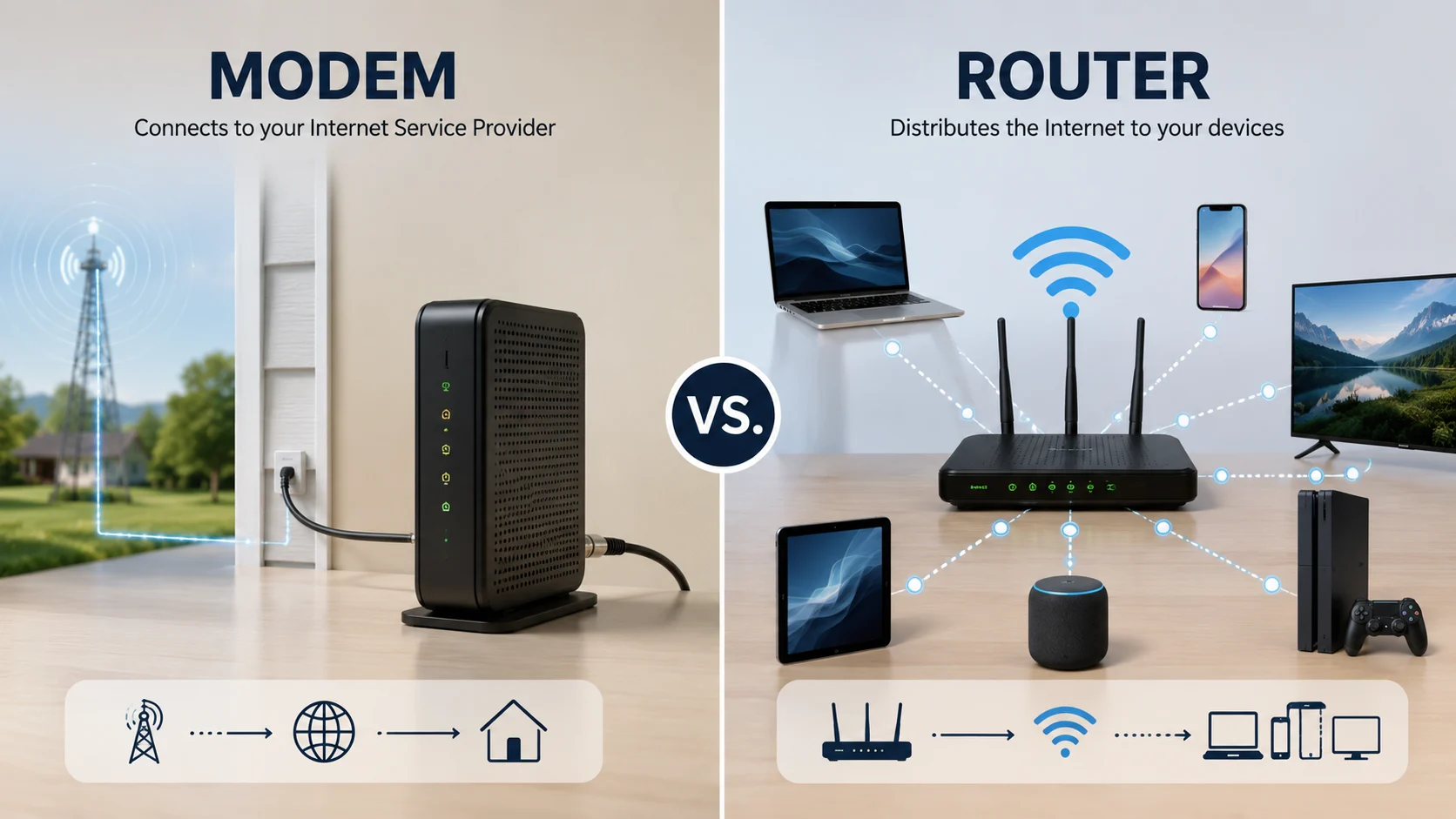
A router or modem serves a different role in a home or business network. A modem connects your network to your internet service provider, while a router distributes that internet connection to multiple devices. Confusing the two can lead to buying the wrong equipment, poor network performance, unnecessary expenses, or difficulty troubleshooting an internet connection.
Router vs Modem | What’s the Difference?
The simplest way to understand a router and a modem is to look at what each device does with your internet connection.
A router is a noun that refers to a networking device that directs data between devices on a local network and manages communication with the internet. It can connect computers, smartphones, televisions, printers, cameras, and other devices through WiFi or Ethernet.
A modem is also a noun. It is a device that establishes communication between your local network and your internet service provider. The modem receives the internet signal supplied by the provider and converts it into a form your network equipment can use.
| Feature | Router | Modem |
|---|---|---|
| Part of speech | Noun | Noun |
| Main function | Directs network traffic between devices | Connects your network to the internet provider |
| Connects to | Devices on your local network | Internet service provider |
| Provides WiFi | Usually yes | Usually no |
| Assigns local network addresses | Usually yes | Usually no |
| Creates a home network | Yes | No |
| Required for internet access | Usually used with a modem | Usually required for wired internet service |
| Common connection | WiFi and Ethernet | Cable, fiber, DSL, or another provider connection |
| Primary role | Traffic management | Internet connection |
Think of the modem as the device that brings the internet connection into your network. The router then organizes that connection and shares it with your devices.
For example, if you have internet service from a cable provider, the modem receives the provider’s signal. Your router connects to the modem and allows your laptop, phone, smart television, and other devices to communicate through the same internet connection.
Mini recap: A modem connects your network to your internet provider. A router manages and distributes that connection. Many modern homes use both devices, although some internet providers supply a combined modem and router in a single unit.
Is Router vs Modem a Grammar, Vocabulary or Usage Issue?
The difference between router and modem is primarily a vocabulary and technology usage issue, not a grammar problem.
Both words are nouns, and neither is an alternative spelling of the other. They describe different networking devices with different functions. You cannot normally replace one with the other without changing the meaning of a sentence.
In casual conversation, people sometimes call the entire internet equipment setup a “router.” This happens because the router is often the device people see and interact with most frequently. However, technically speaking, the router and modem have separate functions.
Formal technical writing should use the correct term. An IT professional discussing an internet connection would normally distinguish between a modem, router, network switch, access point, and other networking equipment.
Academic writing also benefits from precise terminology. If a student writes that a modem distributes WiFi to multiple computers, the sentence may communicate the general idea of internet access, but it does not accurately describe the modem’s primary role.
In casual usage, the distinction may seem minor. In troubleshooting, purchasing, installation, and technical documentation, however, it can be extremely important.
What Is a Router?
A router is a networking device that directs data between different networks. In a typical home, it connects your local network to the internet and decides where data should go.
When you connect your smartphone to home WiFi, for example, the router gives the phone access to the local network and usually assigns it a local IP address. When the phone requests a webpage, the router helps send that request toward the internet.
Modern routers often perform several jobs at once. They may provide WiFi, manage connected devices, offer basic firewall protection, assign IP addresses, support parental controls, and prioritize certain types of network traffic.
Workplace Example
Imagine a small office with fifteen employees. Each employee has a laptop, several people use smartphones, and the office also has network printers and security cameras.
The router manages communication among these devices and provides a path to the internet. Without an appropriate router, managing many simultaneous connections can become difficult.
Academic Example
A networking student might write:
“The router forwards packets between the local network and external networks.”
This is a technically appropriate use of the word because routing is the process of determining where network traffic should travel.
Technology Example
Gaming consoles, smart televisions, laptops, tablets, cameras, and smart home devices may all connect through a modern wireless router.
A newer router can also support technologies designed to improve performance when many devices are connected simultaneously.
Router usage recap: Use router when you mean the device that manages network traffic and connects multiple devices to a network. It is commonly responsible for WiFi and local network management.
What Is a Modem?
A modem connects your local network to the internet service supplied by your provider. The word comes from the older networking concept of modulating and demodulating signals.
Depending on your internet technology, a modem may communicate through a cable connection, telephone based DSL connection, or another type of provider infrastructure. Fiber internet may use an optical network terminal rather than a traditional modem, although everyday conversations sometimes use the word modem broadly for the provider connection device.
The modem’s central purpose is to establish the connection between your network and the service provider.
Workplace Example
Suppose an office suddenly loses internet access. The router may still be powered on, and employees may still be able to connect to the office WiFi, but the modem may have lost communication with the internet provider.
In this situation, checking the modem’s connection status can help identify the problem is between the office network and the provider.
Academic Example
A student studying computer networking might describe a modem as the device that provides communication between the customer’s network and the internet service provider.
This terminology is more accurate than saying that the modem creates the office WiFi network.
Technology Example
A cable internet setup may use a cable modem connected to a router. The modem receives the provider’s service, while the router shares that connection with computers and wireless devices.
Some providers combine both functions into one piece of hardware. This is why consumers sometimes assume that a modem and router are the same device.
Modem usage recap: Use modem when you mean the device responsible for establishing communication with the internet service provider. It brings the provider connection into the network rather than primarily managing your local WiFi devices.
When You Should NOT Use Router or Modem
Several common situations cause people to use router and modem interchangeably. Understanding these mistakes can prevent confusion.
- Do not call every internet device a modem. A WiFi router is not automatically a modem.
- Do not call the provider connection a router. If you are discussing the device receiving service from your internet provider, modem may be the more accurate term.
- Do not assume every router provides internet service by itself. A router can manage a local network without directly connecting to an internet provider.
- Do not assume every modem provides WiFi. A traditional modem may need a separate router to distribute the connection wirelessly.
- Do not use router when you actually mean access point. An access point primarily provides wireless access to an existing network.
- Do not describe a network switch as a router. A switch connects devices within a network and performs a different function.
- Do not buy equipment based only on the word WiFi. A WiFi device may be a router, access point, modem router combination, or another type of networking equipment.
- Do not replace a modem when the problem is actually WiFi coverage. Weak wireless coverage can often be a router or access point issue rather than an internet provider issue.
Common Mistakes and Decision Rules
| Correct sentence | Incorrect sentence | Explanation |
|---|---|---|
| The modem connects my network to the internet provider. | The router connects my network to the internet provider. | The modem normally handles the provider connection in a traditional setup. |
| The router provides WiFi throughout the house. | The modem provides WiFi throughout the house. | WiFi is commonly provided by the router or a wireless access point. |
| I need a new router for better WiFi coverage. | I need a new modem for better WiFi coverage. | Poor coverage is often related to wireless equipment rather than the modem. |
| The modem lost its connection to the provider. | The router lost its connection to the provider. | The modem is normally the device directly communicating with the provider. |
| The router manages devices on my local network. | The modem manages all my local devices. | Local network management is primarily a router function. |
Decision Rule Box
If you mean the device that connects your network to the internet provider, use “modem.”
If you mean the device that directs traffic and shares the connection among devices, use “router.”
If one physical box performs both jobs, it can correctly be described as a modem router combination.
Router and Modem in Modern Technology and AI Tools
Modern networking equipment has become more sophisticated than the simple modem and router setups of the past.
Many internet providers now offer combination devices that contain both modem and router functionality. This reduces the number of physical devices in a home and can make installation easier.
Modern routers can also support advanced WiFi standards, automatic security updates, traffic management, guest networks, device monitoring, and mesh networking.
AI based networking tools can further simplify network management. Some systems analyze connection quality, identify unusual traffic patterns, recommend placement changes, or automatically optimize wireless channels.
Despite these advances, the basic distinction remains useful. The modem side handles communication with the provider, while the router side manages network traffic and connected devices.
Why the Distinction Matters for Internet Troubleshooting
Knowing the difference becomes especially useful when your internet stops working.
If none of your devices can reach the internet, but the router appears powered on, the modem or provider connection may be the problem. If the internet connection is active but one part of your home has weak WiFi, the router or wireless access system may need attention.
This distinction also helps when purchasing equipment. A person replacing a router should not automatically buy a modem, and someone replacing a provider connection device should not assume that a more powerful router will solve the problem.
A simple troubleshooting approach is to identify where the failure occurs. First check your devices can connect to the local network. Then check the network has internet access. This separates local wireless problems from provider connection problems.
Router and Modem Etymology
The word router comes from the idea of routing, meaning directing something along a particular path. In networking, routing refers to directing data packets toward their destinations.
The word modem is formed from the concepts of modulation and demodulation. Historically, modems converted information between forms suitable for transmission over communication systems and then converted the received signals back into usable information.
Both terms therefore describe what the equipment does. Router refers to directing traffic, while modem reflects the process of converting signals for communication.
Expert Style Quotation
“The easiest way to remember the distinction is simple: the modem brings the internet connection in, while the router decides where that connection goes.”
This principle is useful because it focuses on function rather than the physical appearance of the equipment.
Two Practical Case Studies
Case Study One: Home WiFi Problem
A household has a working internet subscription, but the upstairs bedroom consistently has a weak WiFi signal. The family assumes the modem is too slow and replaces it.
The problem remains because the modem was not responsible for wireless coverage. After upgrading the router and repositioning the wireless equipment, the household gets a stronger connection in the bedroom.
Result: The problem was related to WiFi distribution rather than the provider connection.
Case Study Two: Office Internet Failure
A small office has twenty connected devices. Employees can connect to the office WiFi, but none of them can access websites. The router is functioning locally, but the modem shows that the provider connection has failed.
After the provider restores the service, internet access returns to all twenty devices without replacing the router.
Result: The local network was working, while the connection between the network and the provider had failed.
These examples show why correctly identifying the networking device matters before spending money on replacement equipment.
Author expertise: Written by a linguistically informed technology content specialist focused on clear terminology, practical communication, and search friendly educational content.
Error Prevention Checklist
Always Use “Router” When
- You mean the device directing traffic between networks.
- You are discussing home WiFi management.
- You mean the equipment connecting multiple devices to a local network.
- You are discussing routing, local IP management, or wireless network administration.
Never Use “Modem” When
- You specifically mean the device providing WiFi.
- You are discussing local traffic management.
- You mean a wireless access point.
- You are describing the device responsible for directing traffic between connected networks.
Likewise, don’t automatically use router when you mean the equipment receiving internet service directly from your provider.
Related Grammar Confusions You Should Master
Understanding router and modem is a technology vocabulary issue, but it belongs to a broader group of commonly confused terms.
Other useful distinctions include:
- WiFi vs internet
- Router vs switch
- Modem vs access point
- Internet vs Ethernet
- Download vs upload
- Network vs internet
- Website vs webpage
- Browser vs search engine
- Server vs computer
- Data vs information
Learning these distinctions improves both everyday communication and technical writing.
FAQs
Is a router the same thing as a modem?
No. A modem connects your network to the internet provider, while a router manages and distributes that connection to devices.
Do I need both a router and a modem?
Usually, traditional setups use both, although some providers offer one device that combines modem and router functions.
Does a modem give you WiFi?
A traditional modem usually does not. WiFi is normally provided by a router or wireless access point.
Can a router work without a modem?
Yes. A router can manage a local network without a modem, but a traditional home internet connection generally needs suitable equipment to communicate with the provider.
Which is more important, a router or modem?
Both can be important, but they perform different jobs. The modem handles the provider connection, while the router manages your local network and connected devices.
Does changing the router increase internet speed?
It can improve wireless performance and remove network limitations, but it cannot normally increase the internet speed supplied by your provider beyond the service plan.
How do I know whether my modem or router is broken?
Check whether devices can connect to the local network and whether the network can reach the internet. This helps separate a local router issue from a provider connection issue.
Can one device be both a modem and router?
Yes. Many internet providers supply combination equipment that performs both functions in a single physical unit.
Should I buy my own modem and router?
It depends on your provider, service type, compatibility requirements, budget, and desired network features. Check provider requirements before purchasing equipment.
Conclusion
The difference between a router or modem becomes much easier to understand when you focus on function. A modem traditionally establishes the connection between your network and internet service provider, while a router manages that connection and distributes network access to your devices.
If you are discussing internet equipment, troubleshooting a connection, writing technical content, or deciding what hardware to purchase, using the correct term matters. Remember the simplest rule: the modem connects your network to the provider, while the router manages traffic within and beyond your local network.
Understanding this distinction can save time, prevent unnecessary purchases, and make conversations about internet technology much clearer.
Discover More Related Articles:
- Crain or Crane | Correct Spelling, Meaning & Usage Guide In 2026
- Leary or Leery | Learn the Difference with Easy Examples In 2026
- Afterwards or Afterward | Which Is Correct & When Should You Use Each In 2026