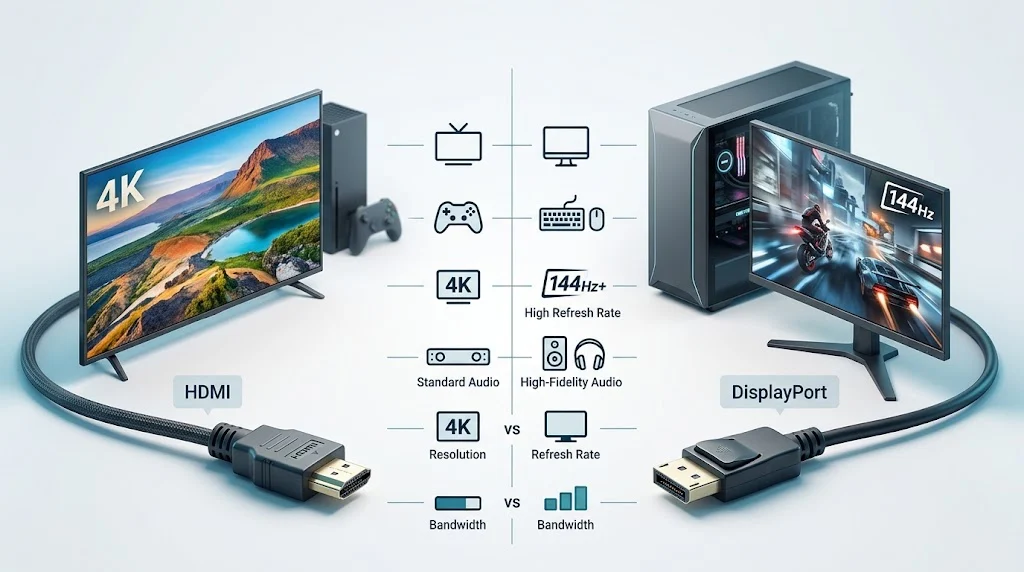
HDMI and DisplayPort are digital audio and video connection standards used to link computers, game consoles, monitors, televisions and other devices. HDMI is especially common in home entertainment, while DisplayPort is widely used with PCs and computer monitors. Choosing the wrong connection can affect resolution, refresh rate, audio support, compatibility and useful features such as variable refresh rate.
HDMI or DisplayPort | What’s the Difference?
HDMI stands for High Definition Multimedia Interface. It is a noun that refers to a digital interface standard designed to transmit high quality video and audio through a single connection. HDMI is extremely common in televisions, streaming devices, game consoles, laptops, sound systems, projectors, and home theater equipment.
DisplayPort is also a noun. It refers to a digital display interface developed primarily for connecting computers and display devices. DisplayPort is particularly common on desktop graphics cards, gaming monitors, professional monitors, and computer docking equipment.
At a basic level, both standards can carry digital video and digital audio. The important difference is not simply image quality. The real distinction involves the devices being connected, the version of the standard, supported bandwidth, maximum resolution and refresh combinations, adaptive synchronization features, multi display capabilities, and the physical ports available on the hardware.
| Feature | HDMI | DisplayPort |
|---|---|---|
| Full name | High Definition Multimedia Interface | DisplayPort |
| Type | Digital audio and video interface | Digital audio and video interface |
| Common devices | TVs, consoles, laptops, projectors, sound systems | PCs, graphics cards, monitors, docking stations |
| Typical strength | Home entertainment and broad device compatibility | PC gaming and high refresh rate displays |
| Audio | Supported | Supported |
| Video | Supported | Supported |
| Gaming features | Depends on version and hardware | Depends on version and hardware |
| Multiple displays | Supported through appropriate hardware and technology | Strong support through DisplayPort features and compatible equipment |
| Connector varieties | Standard HDMI plus smaller variants | Standard DisplayPort plus smaller variants |
| Best choice | Often convenient for TVs and consoles | Often convenient for PCs and gaming monitors |
The simplest takeaway is that neither interface is automatically superior in every situation.
HDMI is often the easiest choice for televisions, consoles, and home entertainment systems.
DisplayPort is frequently the more convenient choice for desktop computers and high refresh rate gaming monitors.
The actual hardware and standard version matter more than the connector name alone.
Is HDMI or DisplayPort a Grammar, Vocabulary or Usage Issue?
Unlike common word confusions, HDMI and DisplayPort are not grammar problems. They are technology terms that describe different interface standards. You normally do not use one as an interchangeable replacement for the other.
The confusion happens because both connections perform similar fundamental jobs. Both can transmit digital video and audio, and both can support high resolution displays. As a result, someone looking at two available ports may reasonably wonder which one provides the better result.
The answer depends on context.
In formal technical writing, product specifications, academic discussions about display technology, and professional IT documentation, HDMI and DisplayPort should be treated as distinct standards. In casual conversation, people may simply call either one a display cable, but that description is too general when the exact connection matters.
For example, saying that a monitor supports a certain resolution is not enough to determine every available connection can run that resolution at the desired refresh rate. The interface version, cable capability, graphics hardware, monitor input, and implementation all matter.
This is why comparing HDMI versus DisplayPort requires more than asking which cable is newer or faster.
What Is HDMI Used For?
HDMI is one of the most familiar digital connectivity standards because it became deeply established in consumer electronics. You can find HDMI ports on televisions, gaming consoles, Blu ray players, streaming devices, AV receivers, projectors, laptops, and many desktop computers.
Its biggest practical advantage is ecosystem compatibility. A television is very likely to have HDMI inputs, and many entertainment devices are designed around HDMI connections.
HDMI can carry both video and audio over one cable. That makes it convenient for home theater setups where a single connection can send picture and sound from a source device to a television or receiver.
Workplace Example
Suppose an employee connects a laptop to a conference room television for a presentation. If the laptop and television both have compatible HDMI ports, an HDMI cable can provide a straightforward connection for the presentation image and sound.
For meeting rooms, classrooms, and general office environments, convenience often matters more than achieving the absolute highest possible gaming refresh rate.
Academic Example
A student might connect a laptop to a classroom projector or external display. HDMI can be a practical choice when the projector is designed around HDMI inputs and the computer provides a compatible output.
The key consideration is compatibility between the source device and the display rather than the theoretical maximum capability of a different interface.
Technology Example
Modern HDMI implementations can support advanced video capabilities, including high resolution output and high refresh rates, depending on the HDMI version and hardware involved. Features such as variable refresh rate and enhanced gaming support are available in relevant HDMI implementations.
This means it is inaccurate to describe HDMI as an outdated technology. Newer HDMI standards are capable of handling demanding modern display requirements.
HDMI usage recap: Choose HDMI when broad consumer device compatibility, television connectivity, console support, or home entertainment convenience is the priority.
What Is DisplayPort Used For?
DisplayPort was designed with computer display connectivity in mind, which helps explain its strong presence in desktop PCs, graphics cards, and computer monitors.
It is particularly popular among users who want high refresh rates, high resolutions, adaptive synchronization, or multi monitor configurations. DisplayPort has also played an important role in PC graphics connectivity as display technology has advanced.
Workplace Example
A professional working with multiple monitors may use DisplayPort outputs from a desktop graphics card or docking station. A compatible setup can make it easier to build a multi display workstation for spreadsheets, design applications, programming, editing, or financial analysis.
Academic Example
A researcher using several displays for data analysis could benefit from a graphics system and monitor arrangement that supports multiple digital displays. DisplayPort can be particularly useful when the computer hardware provides several DisplayPort outputs.
Technology Example
DisplayPort supports technologies designed for sophisticated computer display configurations. Display Stream Compression can help compatible hardware transmit very high resolution and refresh combinations while reducing the amount of raw data that must travel across the link.
DisplayPort also supports Multi Stream Transport, commonly called MST, which can enable multiple displays from a suitable DisplayPort connection and compatible hardware.
DisplayPort usage recap: Choose DisplayPort when connecting a PC to a computer monitor, especially when high refresh rates, advanced graphics features, or multiple monitors are important.
HDMI or DisplayPort for Gaming
Gaming is one of the areas where the comparison becomes more interesting.
For a gaming PC, DisplayPort is often an excellent choice because gaming monitors commonly provide DisplayPort inputs and graphics cards frequently include DisplayPort outputs. It can be especially useful for high refresh rate monitors.
HDMI is also highly capable for gaming. In fact, newer HDMI implementations can be extremely powerful and are particularly important for current game consoles and modern televisions.
The best option therefore depends on the gaming system.
A gaming PC connected to a high refresh rate computer monitor may benefit from DisplayPort.
A PlayStation or Xbox connected to a television will generally use HDMI because that is the standard connection provided by those ecosystems.
For PC gaming, always check the maximum resolution and refresh rate supported by both the graphics card and monitor. A cable can only deliver what the connected hardware and interface versions support.
HDMI or DisplayPort for 4K and High Refresh Rates
A common mistake is to ask HDMI or DisplayPort is better for 4K as though the connector alone determines performance.
It does not.
Different versions of HDMI and DisplayPort have different bandwidth capabilities. The monitor may also impose its own limitations. A graphics card may support a particular output mode while the monitor accepts another. The cable can also become relevant, especially with demanding resolutions and refresh rates.
For example, 4K at 60 Hz is a very different requirement from 4K at 144 Hz. Higher refresh rates require significantly more data. Advanced color formats and high dynamic range can also increase bandwidth requirements.
This is why you should compare the specifications of the exact graphics card, monitor, cable, and interface version instead of relying on a general statement such as DisplayPort is faster.
When You Should NOT Use HDMI or DisplayPort
There are several situations where choosing based only on the connector name can lead to a poor result.
- Do not assume every HDMI port supports the same resolution and refresh rate. HDMI capabilities vary by version and implementation.
- Do not assume every DisplayPort cable delivers every advertised display mode. Cable quality and certification can matter for demanding configurations.
- Do not choose HDMI simply because it is more familiar when a PC monitor offers a DisplayPort connection specifically designed for the desired refresh rate.
- Do not choose DisplayPort automatically for a television when the television is built around HDMI inputs and HDMI based features.
- Do not buy a cable before checking the actual ports on both devices.
- Do not confuse a physical connector with the complete capability of the system.
- Do not assume that a newer cable can upgrade an older device beyond the limits of its hardware.
- Do not ignore audio requirements. Both standards can carry audio, but the exact capabilities depend on the devices and implementation.
The safest approach is to start with the source device and display specifications, then select the connection that supports the required mode.
Common HDMI and DisplayPort Mistakes
| Correct sentence | Incorrect sentence | Explanation |
|---|---|---|
| I connected my gaming PC to the monitor through DisplayPort. | I used DisplayPort because it always has better picture quality. | DisplayPort does not automatically produce better picture quality. The supported configuration matters. |
| My console connects to the TV through HDMI. | My console needs DisplayPort because it is newer. | Consoles commonly use HDMI and should be connected according to their available outputs and the TV inputs. |
| I checked the monitor specifications before buying the cable. | Any HDMI cable will provide the maximum refresh rate. | Cable capability and the supported HDMI version can affect demanding display modes. |
| My monitor supports a high refresh rate through a specific input. | Every port on my monitor must support the same refresh rate. | Different inputs can have different capabilities. |
| I selected DisplayPort for my multi monitor PC setup. | DisplayPort always supports unlimited monitors. | Multi monitor capability depends on compatible hardware, MST support, display configuration, and bandwidth. |
Decision Rule Box
If you are connecting a PC to a computer monitor, check DisplayPort first when high refresh rates, advanced PC gaming features, or multi monitor use are important.
If you are connecting a console, television, projector, or home entertainment device, check HDMI first because it is commonly built into those ecosystems.
If both options support the exact resolution and refresh rate you need, choose the connection that offers the simplest and most compatible setup.
HDMI and DisplayPort in Modern Technology and AI Tools
Modern computers increasingly depend on high resolution and high refresh rate displays for gaming, content creation, software development, data analysis, and artificial intelligence workflows.
AI tools themselves do not fundamentally require HDMI or DisplayPort. An AI application running on a computer uses the computer’s processor, graphics hardware, memory, and software environment. The display interface simply determines how the resulting visual output reaches a monitor.
This distinction is useful for users building AI workstations. A powerful graphics card may support several display outputs, allowing users to connect multiple high resolution monitors. In such a setup, DisplayPort can be particularly useful for computer focused multi display environments, while HDMI remains valuable for connecting a workstation to a television or other consumer display.
HDMI or DisplayPort | Which One Has Better Image Quality?
Neither interface automatically produces a better looking image simply because of its name.
When two connections transmit the same compatible digital signal with the same resolution, refresh rate, color configuration, and other settings, the visible image can be effectively identical.
Differences become important when one connection supports a display mode that the other connection cannot provide.
For example, if one port supports a particular high refresh rate while another is limited to a lower refresh rate, the first connection may provide a visibly smoother experience in gaming and motion.
The practical question is therefore not which interface has prettier pixels. It is which interface can reliably deliver the display mode you want.
HDMI or DisplayPort for Multiple Monitors
DisplayPort has a strong reputation for multi monitor computer setups because of technologies such as Multi Stream Transport.
A compatible DisplayPort connection can carry multiple display streams through suitable hardware and devices. This can be useful in professional environments where users need several monitors.
HDMI can also participate in multi monitor configurations, but the implementation may require additional outputs, adapters, docks, or other hardware.
If you are building a workstation with two, three, or more monitors, check your graphics card specifications first. The number and type of outputs can be more important than choosing a theoretically superior interface.
HDMI or DisplayPort for TVs and Consoles
For television and console use, HDMI is generally the practical choice.
Modern televisions are designed around HDMI connectivity, and game consoles are built to work with HDMI based display systems. Audio return and home theater functionality also make HDMI particularly useful in consumer entertainment environments.
DisplayPort is much less common on televisions. A PC user may encounter DisplayPort frequently on a monitor but rarely need it when connecting directly to a typical living room TV.
This is a strong example of why the best connection depends on the ecosystem.
Etymology and Technical Background
The name HDMI describes its purpose directly: High Definition Multimedia Interface. The term emphasizes both high definition video and multimedia transmission.
DisplayPort uses the word display to identify its primary purpose and port to describe the connection point. The standard was developed by the Video Electronics Standards Association, commonly known as VESA, as a modern digital display interface.
Both standards evolved over time. Their capabilities have expanded considerably as displays moved from basic high definition panels toward 4K, high refresh rates, high dynamic range, and increasingly demanding professional applications.
“The best interface is the one that matches the capabilities of the source, display, cable, and required display mode.”
This is the most useful principle to remember because connector choice should be based on the complete system rather than marketing claims.
Two Practical Case Studies
Case Study One: A High Refresh Rate Gaming PC
Imagine a desktop gaming PC with a modern dedicated graphics card connected to a 1440p gaming monitor capable of a very high refresh rate. The monitor provides both HDMI and DisplayPort inputs.
The user checks the specifications and discovers that the desired refresh rate is supported through DisplayPort but not through the available HDMI connection. DisplayPort becomes the logical choice.
The result is not because DisplayPort magically improves the graphics. It is because that specific connection supports the display mode the gamer wants.
Case Study Two: A Console and 4K Television
Now consider a game console connected to a 4K television. The television has several HDMI inputs and no DisplayPort input.
HDMI is the obvious choice because the console and television were designed around that connection. There is no practical benefit in trying to convert the signal to DisplayPort when the native HDMI connection already provides the required functionality.
These examples demonstrate an important result: the right interface is determined by compatibility and requirements, not by a universal ranking.
Error Prevention Checklist
Always use HDMI when
- You are connecting a typical game console to a television.
- Your home theater equipment is built around HDMI.
- Your television provides HDMI inputs for the required display mode.
- HDMI supports the resolution and refresh rate you need.
Never use DisplayPort when
- The display does not provide a compatible DisplayPort input.
- Your selected adapter does not support the required resolution and refresh rate.
- You are choosing it solely because you assume it automatically provides better image quality.
- The native HDMI connection already provides everything your entertainment setup requires.
Related Technology Confusions You Should Master
Understanding HDMI and DisplayPort becomes easier when you also understand several related technology comparisons.
- HDMI versus DVI
- DisplayPort versus USB C
- USB C versus Thunderbolt
- HDMI 2.0 versus HDMI 2.1
- DisplayPort 1.4 versus DisplayPort 2.1
- Refresh rate versus frame rate
- Resolution versus pixel density
- HDR versus SDR
- Adaptive Sync versus fixed refresh rate
- Active versus passive display adapters
These topics are connected because modern display performance depends on the entire signal chain. Knowing only the connector type is rarely enough.
FAQs
Is HDMI better than DisplayPort for gaming?
Not universally. DisplayPort is often convenient for high refresh rate PC gaming, while HDMI is essential for many consoles and televisions.
Should I use DisplayPort or HDMI for a PC monitor?
Check the monitor and graphics card specifications first. DisplayPort is often a strong choice for high refresh rate PC monitors.
Does DisplayPort give better picture quality than HDMI?
Not automatically. When both connections support the same digital signal and settings, visible image quality can be effectively the same.
Is HDMI better for a TV than DisplayPort?
Usually, yes for practical compatibility because televisions commonly provide HDMI inputs and consumer devices are designed around HDMI.
Can HDMI support 4K at high refresh rates?
Yes, depending on the HDMI version, hardware, cable, display, and exact resolution and refresh rate combination.
Can DisplayPort carry audio?
Yes. DisplayPort can transmit digital audio as well as video when supported by the connected hardware.
Which is better for dual monitors, HDMI or DisplayPort?
DisplayPort can be particularly useful for PC multi monitor setups, especially when compatible hardware supports Multi Stream Transport.
Does the HDMI or DisplayPort cable matter?
Yes. The cable needs to support the required specification and bandwidth for demanding resolution and refresh rate combinations.
Can I convert HDMI to DisplayPort?
Conversion is possible with appropriate adapters, but compatibility depends on signal direction, device requirements, power needs, and supported display modes.
Should I choose HDMI or DisplayPort for a gaming monitor?
Choose the connection that supports the monitor’s desired resolution, refresh rate, adaptive synchronization features, and other requirements with your graphics hardware.
Conclusion
The HDMI or DisplayPort decision is not really about choosing a permanent winner. HDMI is exceptionally practical for televisions, game consoles, projectors, and home entertainment systems, while DisplayPort is often an excellent fit for desktop computers, high refresh rate monitors, and advanced multi monitor workstations.
The smartest approach is to compare the exact ports and specifications on your graphics card, laptop, console, monitor, television, and cable. If both interfaces support the display mode you need, either can be an excellent choice. If only one supports your desired resolution, refresh rate, or feature set, the decision becomes straightforward.
Understanding the complete connection chain will help you avoid unnecessary adapters, disappointing refresh rates, compatibility problems, and wasted money. Instead of asking which interface is always better, ask which one best matches your particular hardware and display requirements.
Discover More Related Articles:
- Dumby or Dummy | Which Form Belongs in Your Sentence In 2026
- Tomato or Tomatoe | Everything You Need to Know In 2026
- Cord or Chord | Meaning, Spelling, Usage & Easy Ways to Remember In 2026