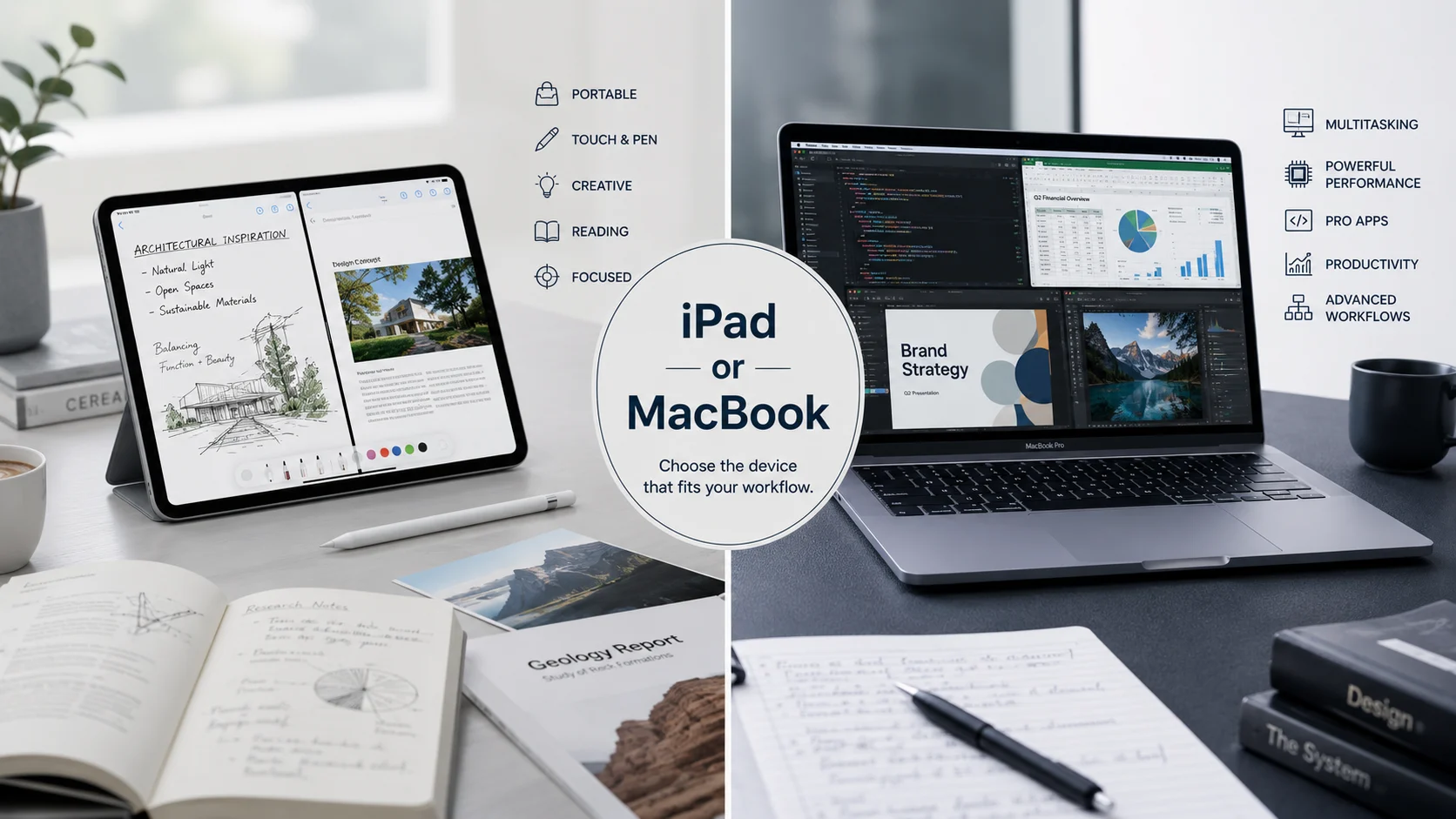
iPad or MacBook is a common buying question because both Apple devices can handle browsing, studying, writing, entertainment, communication, and creative work. An iPad is a touchscreen tablet designed around portability and touch interaction, while a MacBook is a laptop designed for desktop productivity, multitasking, and professional software. Choosing the wrong one can mean paying for features you rarely use.
iPad or MacBook | What’s the Difference?
Although both devices belong to the Apple ecosystem, they are designed around different styles of computing. The iPad runs iPadOS and emphasizes touch, portability, Apple Pencil support, media consumption, and flexible everyday use. A MacBook runs macOS and provides the traditional laptop experience with a physical keyboard, trackpad, desktop applications, extensive file management, and powerful multitasking.
The difference isn’t simply about screen size or price. It is about how you work. Someone who spends most of the day reading documents, taking handwritten notes, drawing, watching videos, and browsing websites may prefer an iPad. Someone who regularly writes long documents, manages complex spreadsheets, codes, edits professional media, or uses several desktop applications simultaneously will usually benefit more from a MacBook.
| Feature | iPad | MacBook |
|---|---|---|
| Device type | Tablet | Laptop |
| Operating system | iPadOS | macOS |
| Main interaction | Touch, Apple Pencil, keyboard | Keyboard and trackpad |
| Portability | Excellent | Very good |
| Multitasking | Strong for tablet workflows | Excellent for desktop workflows |
| App environment | iPad applications | Desktop applications |
| Note taking | Excellent | Very good |
| Drawing | Excellent with Apple Pencil | Better with external accessories |
| Coding | Limited compared with macOS | Excellent |
| Professional software | More limited | Much broader support |
| File management | Simple and streamlined | Advanced and flexible |
| Best for | Students, readers, artists, casual users | Professionals, developers, creators, power users |
The iPad is essentially a portable touch computer that excels at simplicity and flexibility.
The MacBook provides a more complete traditional computer experience.
An iPad is often better for consumption and touch based creation.
A MacBook is generally better for intensive productivity and professional workflows.
The right choice depends more on your daily tasks than on specifications alone.
Is iPad or MacBook a Grammar, Vocabulary or Usage Issue?
Unlike traditional word comparisons, this isn’t a grammar or vocabulary issue. iPad and MacBook are names for two different categories of Apple computing devices. The question is primarily about technology usage, purchasing decisions, and personal workflow.
Neither term is formal or informal in the linguistic sense. Both are standard product names. You can use either term in academic writing, workplace communication, technology journalism, product reviews, or casual conversation.
The important distinction is contextual. Saying that you use an iPad when you actually rely on a MacBook for desktop software can create confusion about your working environment. Similarly, describing an iPad as a conventional laptop can give someone the wrong expectation about its operating system, applications, and interaction model.
In academic settings, an iPad may be ideal for reading research papers, annotating documents, taking handwritten notes, and attending online classes. A MacBook may be preferable for writing lengthy assignments, managing references, running specialized software, and working with several applications at once.
In casual use, the choice is even more flexible. Both can browse the internet, stream content, communicate with others, access cloud storage, and handle everyday productivity.
When to Use an iPad
An iPad makes the most sense when portability and touch interaction are central to your routine.
For workplace use, imagine a sales professional who travels between meetings. An iPad can provide quick access to presentations, email, customer information, documents, and digital forms without requiring a traditional laptop setup. With a compatible keyboard, it can also handle emails and shorter documents comfortably.
For academic use, an iPad can be particularly useful for students who read textbooks and research papers digitally. Apple Pencil support makes handwritten annotation, diagrams, mathematical working, and visual notes feel more natural than typing everything.
For technology and creative work, an iPad is attractive for illustration, photo editing, sketching, video consumption, content planning, and mobile photography workflows. Its touch interface can make visual tasks feel direct and intuitive.
The iPad is also appealing for people who already own a desktop computer and want a lightweight companion device. In that situation, it doesn’t need to replace a computer. It can complement one.
iPad Usage Recap
Choose an iPad when portability, touch interaction, reading, handwriting, drawing, entertainment, and lightweight productivity matter most. It is especially attractive when you want a device that can quickly move between study, creativity, travel, and casual use.
When to Use a MacBook
A MacBook becomes more compelling when your work depends on a traditional desktop environment.
In the workplace, consider a professional who spends hours working with spreadsheets, presentations, databases, browser tabs, communications software, and cloud platforms. A MacBook makes it easier to arrange multiple windows, connect peripherals, manage files, and move between applications.
For academic work, a MacBook is useful when assignments require extensive research, citation management, programming, data analysis, specialized applications, or long periods of writing. The physical keyboard and desktop environment can be more comfortable for substantial workloads.
For technology professionals, the distinction becomes even clearer. Developers, software engineers, designers, data analysts, and advanced content creators often need applications or workflows that are better supported by macOS. A larger desktop environment also makes sustained multitasking easier.
A MacBook can therefore serve as a primary computer for someone who wants one device capable of handling both ordinary tasks and demanding professional work.
MacBook Usage Recap
Choose a MacBook when desktop software, sustained typing, advanced multitasking, coding, professional applications, complex file management, and demanding creative workflows are important. It is generally the safer primary computer for users with advanced productivity requirements.
When You Should NOT Use an iPad or MacBook
Choosing a device based only on popularity can lead to an expensive mismatch. Consider what the device needs to accomplish before deciding.
- Do not choose an iPad as your only computer if your work depends heavily on specialized desktop applications.
- Do not choose a MacBook simply for reading, streaming, handwritten notes, and casual browsing if you strongly prefer a lightweight touchscreen device.
- Do not assume adding a keyboard automatically turns an iPad into a MacBook. The operating systems and application environments remain different.
- Do not buy a MacBook primarily because it appears more powerful if your daily activities rarely require that power.
- Do not choose an iPad for a workflow that requires extensive desktop file management and numerous professional applications.
- Do not choose a MacBook when maximum touch interaction and handwriting are the central reasons you want a new device.
- Do not compare devices solely by processor specifications. Your software requirements and working habits matter more.
- Do not overlook the total setup. Accessories, storage, keyboard requirements, external displays, and other equipment can change the practical value of either option.
Common Mistakes and Decision Rules
Many buyers make the same mistake: they compare specifications without first identifying the job they need the device to perform. A better approach is to begin with tasks.
| Correct sentence | Incorrect sentence | Explanation |
|---|---|---|
| I use an iPad for handwritten notes. | I use a MacBook because I need handwriting. | The iPad provides a more natural touch and stylus experience. |
| I use a MacBook for software development. | I use an iPad for every programming workflow. | macOS provides broader support for professional development tools. |
| I use an iPad for reading research papers. | I need a MacBook just to read documents. | An iPad is highly convenient for portable reading and annotation. |
| I use a MacBook for complex spreadsheets. | An iPad is always better for office work. | Desktop multitasking can make a MacBook more suitable for complex work. |
| I use an iPad for digital drawing. | A MacBook is automatically better for drawing. | Direct touch and stylus interaction give the iPad an advantage for many artists. |
| I use a MacBook as my primary computer. | A tablet always replaces a laptop. | Some professional workflows still require a traditional desktop environment. |
Decision Rule:
If your priority is portability, touch interaction, handwriting, reading, or drawing, an iPad is usually the stronger choice. If your priority is desktop software, coding, complex multitasking, long form writing, or professional workflows, a MacBook is usually the stronger choice.
iPad or MacBook in Modern Technology and AI Tools
Modern software has narrowed the gap between tablets and laptops, but it hasn’t removed the fundamental distinction.
AI tools are increasingly available on both platforms. Users can access AI assistants, writing applications, image tools, research platforms, cloud services, productivity applications, and browser based AI systems from either device.
The more important question is how you use those tools. A student may prefer an iPad for reading AI generated explanations, annotating research, handwriting ideas, and reviewing study material. A professional may prefer a MacBook when AI tools need to be combined with spreadsheets, coding environments, databases, browser windows, documents, and other desktop applications.
The iPad is therefore not simply a smaller computer. Its strengths come from its touch first design. The MacBook is not simply a larger iPad. Its strengths come from macOS and the desktop computing model.
Authority and Trust: Understanding the Technology Behind the Choice
The names themselves reflect Apple’s product strategy. iPad was introduced as Apple’s tablet platform in 2010, creating a product category positioned between smartphones and conventional computers. MacBook belongs to Apple’s notebook computer family and provides a macOS based desktop environment.
The two products have evolved substantially, but their core identities remain recognizable. The iPad emphasizes mobility and touch. The MacBook emphasizes traditional computing, productivity, and desktop software.
A useful expert style observation is:
“The best device isn’t the one with the longest specification sheet. It’s the one that fits the user’s actual workflow.”
That principle is particularly important when comparing technology products. Performance matters, but practical suitability matters more.
Case Study One: The University Student
Consider a university student whose daily routine involves reading electronic textbooks, taking lecture notes, marking research papers, attending online classes, and preparing presentations.
An iPad can simplify this workflow because the student can carry one lightweight device between lectures and use touch and stylus input for handwritten notes. If the student’s academic software requirements remain modest, the iPad may provide an excellent balance between portability and productivity.
However, if the same student studies computer science and spends substantial time compiling code, using development environments, managing large projects, and working with several desktop applications, a MacBook becomes more appropriate.
The lesson is simple: the same person can benefit from a different device depending on the academic discipline and workload.
Case Study Two: The Professional Creator
Now consider a freelance designer who sketches concepts, reviews client materials, edits images, writes proposals, communicates with customers, and manages project files.
An iPad can be excellent for visual brainstorming, drawing, markup, and client presentations. A MacBook can become more valuable when the workflow depends on professional desktop applications, complex file structures, multiple windows, and extended keyboard use.
A hybrid workflow can even make sense when budget allows it. One device can serve as the primary computer while the other provides specialized advantages.
Error Prevention Checklist
Always Use an iPad When
[ ] Your priority is portability and touch interaction.
[ ] You regularly write handwritten notes.
[ ] You enjoy drawing or visual annotation.
[ ] You read many digital books and documents.
[ ] You want a lightweight companion device.
[ ] Your everyday applications are well supported on iPadOS.
Never Use an iPad as Your Only Device When
[ ] Your work requires specialized desktop applications.
[ ] You depend on advanced coding environments.
[ ] You regularly manage complex desktop workflows.
[ ] Your productivity depends on extensive window based multitasking.
Always Use a MacBook When
[ ] You need a traditional computer environment.
[ ] You write extensively every day.
[ ] You develop software.
[ ] You use advanced professional applications.
[ ] You manage complicated projects and files.
[ ] You need sustained multitasking.
Related Grammar Confusions You Should Master
Although iPad and MacBook are technology terms rather than grammar pairs, readers who enjoy language clarification may also benefit from mastering common English usage distinctions.
- Affect vs Effect
- Compliment vs Complement
- Principal vs Principle
- Advice vs Advise
- Practice vs Practise
- License vs Licence
- Everyday vs Every Day
- Stationary vs Stationery
- Whose vs Who’s
- Lose vs Loose
Learning these distinctions improves clarity because small differences can change meaning, just as choosing between an iPad and a MacBook can change how effectively a digital workflow functions.
FAQs
Which is better for students, iPad or MacBook?
An iPad is excellent for notes, reading, drawing, and portability, while a MacBook is better for advanced software, coding, and extensive academic work.
Can an iPad replace a MacBook?
An iPad can replace a MacBook for many everyday tasks, but users who depend on desktop applications and advanced multitasking may still need a MacBook.
Is an iPad good for college students?
Yes, particularly for reading, handwritten notes, presentations, online classes, research annotation, and portable study.
Is a MacBook better than an iPad for work?
For professional desktop software, complex multitasking, long documents, coding, and advanced workflows, a MacBook is generally more capable.
Which is better for drawing, iPad or MacBook?
An iPad is usually more convenient for drawing because its touchscreen and Apple Pencil support provide direct interaction with the canvas.
Which is better for programming, iPad or MacBook?
A MacBook is generally the better choice for serious programming because macOS supports a much broader desktop development environment.
Should I buy an iPad or MacBook for everyday use?
Choose an iPad for portability and touch based everyday activities, or a MacBook when you want a full traditional computer.
Can I use the same Apple services on iPad and MacBook?
Many Apple services and applications work across both platforms, although individual applications and features can differ between iPadOS and macOS.
Which lasts longer, an iPad or MacBook?
Both can provide years of useful service, but practical longevity depends on battery condition, software support, storage, performance requirements, and how demanding your workload becomes.
Conclusion
There is no universal winner because these devices solve different problems. The iPad is an excellent choice for portability, touch interaction, handwriting, reading, drawing, entertainment, and flexible everyday productivity. The MacBook is the stronger choice for traditional computer work, professional software, coding, extensive typing, advanced multitasking, and demanding workflows.
If you want a device that feels immediate, portable, and touch friendly, the iPad deserves serious consideration. If you want one machine to function as a complete professional computer, the MacBook is usually the safer choice.
The smartest approach is to ignore the idea that one device must be better for everyone. Start with your daily tasks, identify the applications you need, consider how much typing and multitasking you perform, and then choose the device that fits those requirements.
Ultimately, iPad or MacBook is not really a question of which Apple device is universally superior. It is a question of which computing experience matches the way you study, work, create, and spend your time.
Discover More Related Articles:
- Alter or Altar | Spelling, Usage & Easy Ways to Remember the Difference In 2026
- Tase or Taze | Which Spelling Is Correct & When to Use Each In 2026
- Cue or Que | Meaning, Usage & the Correct Spelling In 2026