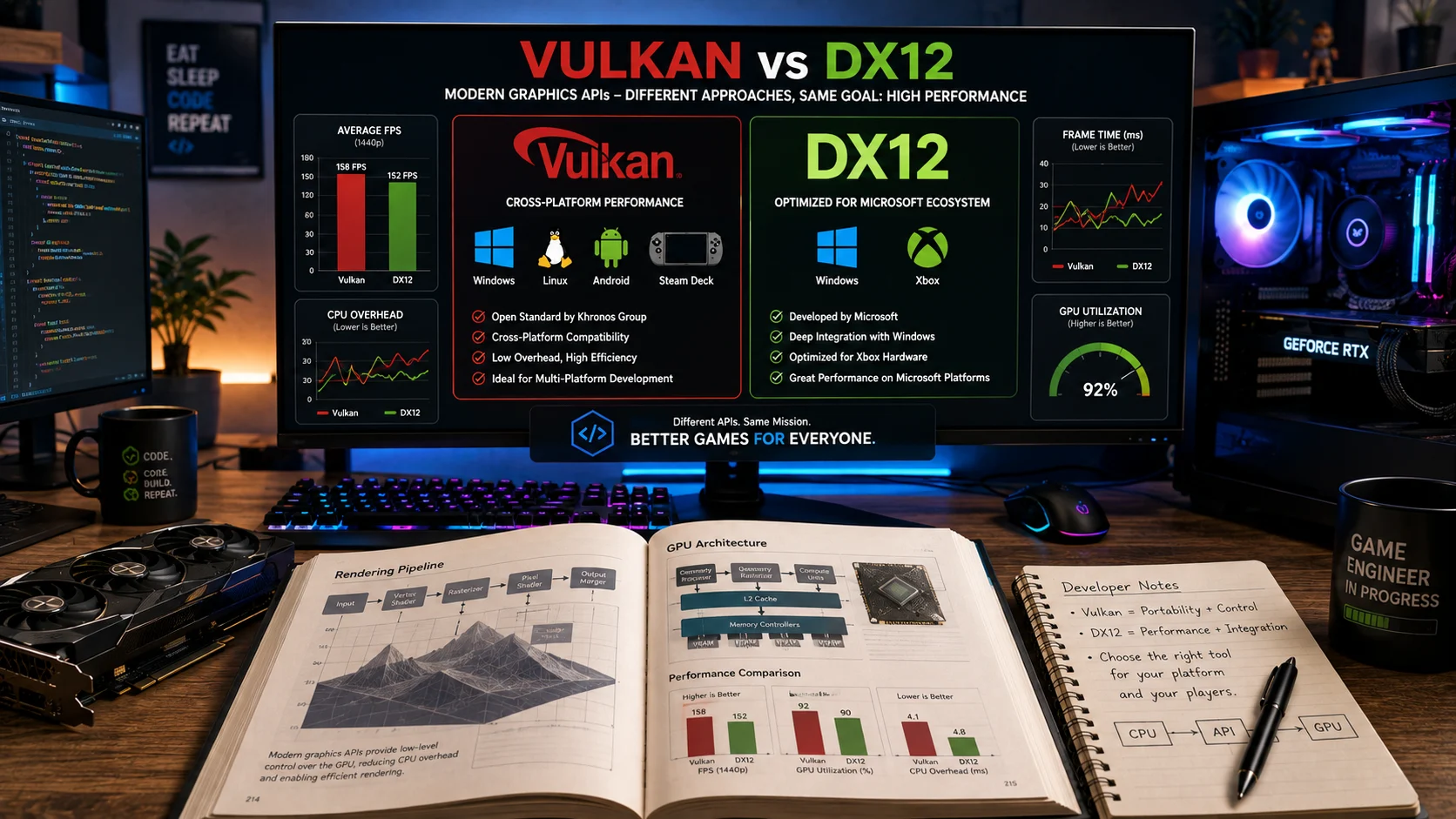
Vulkan or DX12 refers to two advanced graphics application programming interfaces that help games communicate with computer hardware. Vulkan is a cross platform API maintained by the Khronos Group, while DX12, also known as DirectX 12, is developed by Microsoft for Windows and Xbox. Choosing the right API depends on your operating system, hardware, and performance needs.
Choosing the right graphics API can have a real impact on gaming performance, frame rates, CPU usage, and overall system efficiency. That’s why the Vulkan or DX12 debate continues among PC gamers, developers, and hardware enthusiasts. Both APIs give modern games low level access to graphics hardware, but they approach performance and platform support differently. So, which one should you choose?
When comparing DX12 vs Vulkan, there is no universal winner. The better option depends on the game, GPU, operating system, drivers, and how well the developer has optimized the implementation. In this guide, we’ll break down Vulkan or DX12 in simple terms and compare their performance, compatibility, features, and practical use cases. We’ll also explain how graphics API Vulkan or DirectX 12 differs, examine Vulkan vs DirectX, and settle the Vulkan vs DX12 question with clear, real world guidance for gamers and developers.
Vulkan or DX12 | What’s the Difference?
Although Vulkan and DirectX 12 share many design goals, they differ in platform support, ecosystem, development approach, and optimization. Vulkan focuses on portability and flexibility, while DirectX 12 emphasizes deep integration with Microsoft platforms.
| Feature | Vulkan | DirectX 12 |
|---|---|---|
| Type | Graphics API | Graphics API |
| Developer | Khronos Group | Microsoft |
| License | Open standard | Proprietary |
| Operating Systems | Windows, Linux, Android, SteamOS and more | Windows and Xbox |
| Hardware Support | AMD, NVIDIA, Intel, Qualcomm and others | AMD, NVIDIA and Intel on Windows |
| Cross Platform | Yes | No |
| Performance | Excellent with proper optimization | Excellent on Windows |
| Learning Curve | Steeper | Slightly easier for Windows developers |
| Primary Audience | Cross platform developers | Windows and Xbox developers |
Mini Recap
Vulkan is designed for developers who need one graphics API across multiple platforms. DirectX 12 is built specifically for Microsoft’s ecosystem and often delivers outstanding performance on Windows and Xbox. Neither API is universally better because the ideal choice depends on your project goals and target devices.
Is Vulkan or DX12 a Grammar, Vocabulary or Usage Issue?
Unlike common English word comparisons, Vulkan and DirectX 12 are not a grammar issue. They are technical terms representing different graphics APIs used in computer programming and gaming.
The names should never be used interchangeably because they refer to separate technologies maintained by different organizations.
In formal technical writing, always use the official names:
- Vulkan
- DirectX 12
- DX12
Casual conversations often shorten DirectX 12 to DX12, which is widely accepted among gamers and developers. In academic papers, technical documentation, and professional software guides, using the complete name on first mention improves clarity.
The confusion usually comes from benchmark videos and game settings where both APIs appear as selectable graphics options. Since both improve rendering efficiency, some users mistakenly believe they are simply different names for the same technology.
Understanding Vulkan
Vulkan is a modern low level graphics and compute API created by the Khronos Group. It gives software developers direct control over graphics hardware, allowing applications to reduce CPU overhead and make better use of multiple processor cores.
Unlike older graphics APIs that handled many operations automatically, Vulkan places more responsibility on developers. This added complexity allows games and applications to achieve higher efficiency when implemented correctly.
Key Characteristics of Vulkan
Vulkan offers several important advantages.
It works across multiple operating systems including Windows, Linux, Android, and SteamOS.
It supports a wide range of hardware manufacturers.
It provides low level access to GPUs for maximum optimization.
It enables efficient multithreaded rendering.
It is an open standard rather than proprietary software.
Workplace Example
A game development studio building a title for Windows, Linux, and handheld gaming devices chooses Vulkan because one rendering backend can support multiple platforms.
Academic Example
A university computer graphics course teaches Vulkan to help students understand modern GPU programming concepts that apply across different operating systems.
Technology Example
A graphics intensive Android application uses Vulkan to improve rendering performance and reduce CPU usage compared with older graphics technologies.
Vulkan Usage Recap
Vulkan is the preferred option when portability, hardware flexibility, and cross platform compatibility are major priorities. Although development is more challenging, experienced programmers can achieve excellent performance across many devices.
Understanding DirectX 12
DirectX 12, commonly abbreviated as DX12, is Microsoft’s latest generation graphics API for Windows and Xbox. It provides developers with low level hardware access while integrating closely with the Windows operating system.
Because Microsoft controls both the operating system and Xbox ecosystem, DirectX 12 benefits from extensive platform specific optimizations that many games take advantage of.
Key Characteristics of DirectX 12
DirectX 12 provides several notable benefits.
It is optimized specifically for Windows.
It powers modern Xbox consoles.
It reduces CPU bottlenecks.
It supports advanced graphics features including hardware accelerated ray tracing.
It integrates closely with Microsoft’s development tools.
Workplace Example
A game studio creating an exclusive Xbox and Windows release selects DirectX 12 because it offers seamless integration with Microsoft’s development environment.
Academic Example
Students learning Windows game programming often begin with DirectX 12 because it is widely used in commercial game development.
Technology Example
A modern PC game enables DirectX 12 mode to improve frame rates, reduce CPU overhead, and support advanced rendering techniques on compatible graphics cards.
DirectX 12 Usage Recap
DirectX 12 is often the strongest choice for Windows only games and Xbox development. Developers benefit from Microsoft’s ecosystem, mature tools, and platform specific optimizations that can deliver excellent gaming performance.
Vulkan and DirectX 12 Performance Comparison
Choosing between Vulkan and DirectX 12 often comes down to performance in specific games rather than one API consistently outperforming the other.
| Performance Area | Vulkan | DirectX 12 |
|---|---|---|
| Windows Gaming | Excellent | Excellent |
| Linux Gaming | Excellent | Not Supported |
| Xbox Development | Not Supported | Excellent |
| Android Graphics | Excellent | Not Supported |
| CPU Efficiency | Very High | Very High |
| Multi Core Scaling | Excellent | Excellent |
| Driver Dependence | Moderate | Lower on Windows |
| Cross Platform Development | Excellent | Limited |
When You Should NOT Use Vulkan or DX12
Although both APIs are powerful, choosing the wrong one can lead to compatibility issues, reduced performance, or unnecessary development complexity. Understanding when each API is unsuitable helps developers and gamers make informed decisions.
| Situation | Avoid Vulkan | Avoid DirectX 12 |
|---|---|---|
| Building a Windows only application | No | Yes if cross platform support is needed |
| Developing for Linux | No | Yes |
| Creating Android games | No | Yes |
| Targeting Xbox consoles | Yes | No |
| Needing maximum platform portability | No | Yes |
| Depending on Windows exclusive tools | Yes | No |
| Supporting legacy operating systems | Sometimes | Sometimes |
| Expecting identical performance in every game | Yes | Yes |
Some developers mistakenly assume Vulkan automatically delivers better performance than DirectX 12. In reality, game engine optimization, graphics drivers, and hardware architecture often influence performance more than the API itself.
Common Mistakes and Decision Rules
The following table highlights common misconceptions surrounding Vulkan and DirectX 12.
| Correct Statement | Incorrect Statement | Explanation |
|---|---|---|
| Vulkan works across several operating systems. | Vulkan only works on Windows. | Vulkan supports Windows, Linux, Android, and several other platforms. |
| DirectX 12 is designed for Windows and Xbox. | DirectX 12 works on every operating system. | DirectX 12 is part of Microsoft’s ecosystem. |
| Some games perform better with Vulkan. | Vulkan is always faster than DX12. | Performance depends on optimization and hardware. |
| DX12 supports advanced rendering features. | DX12 is an outdated graphics API. | DirectX 12 powers many modern games. |
| Vulkan is maintained by the Khronos Group. | Microsoft develops Vulkan. | Different organizations manage the two APIs. |
| Developers choose based on project goals. | One API is perfect for every project. | Platform requirements determine the best choice. |
Decision Rule Box
| If your goal is | Choose |
|---|---|
| Build software for multiple operating systems | Vulkan |
| Develop games for Windows and Xbox | DirectX 12 |
| Reach Android devices | Vulkan |
| Take advantage of Microsoft’s graphics ecosystem | DirectX 12 |
| Maximize platform flexibility | Vulkan |
| Focus exclusively on Windows gaming | DirectX 12 |
Vulkan and DX12 in Modern Technology and AI Tools
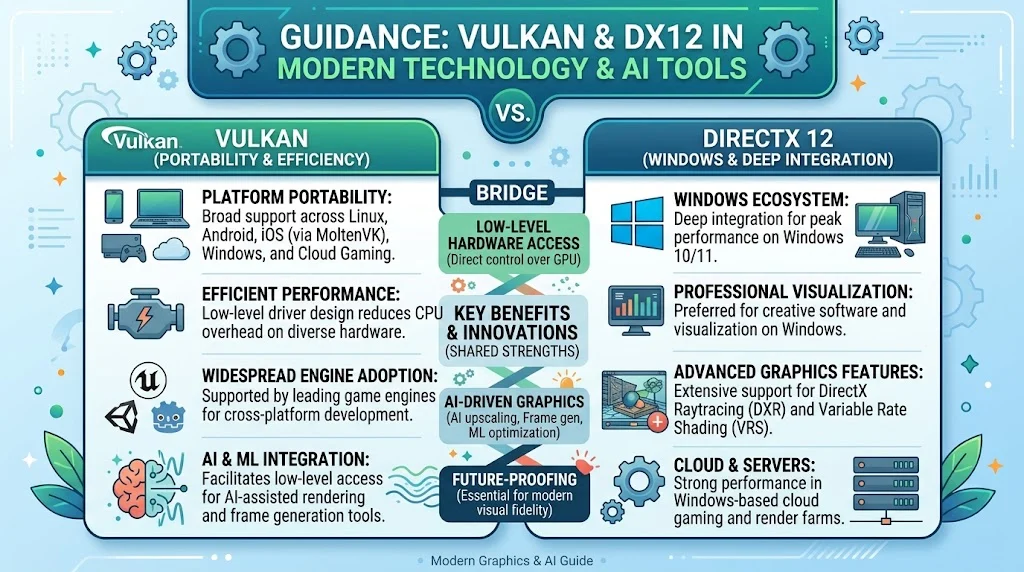
Modern game engines increasingly support both Vulkan and DirectX 12, allowing developers to select the most suitable rendering backend for each platform.
Popular engines such as Unreal Engine, Unity, and Godot include support for these APIs, making it easier to deliver consistent graphics across different devices. AI assisted rendering tools, frame generation technologies, and machine learning based graphics optimization also benefit from the low level hardware access offered by both APIs.
Cloud gaming services, virtual reality applications, and professional visualization software frequently rely on Vulkan for portability, while Windows based creative software often integrates deeply with DirectX 12.
The Origin of Vulkan and DirectX 12
The name Vulkan comes from the Roman god of fire and metalworking, symbolizing power and craftsmanship. It succeeded OpenGL as the Khronos Group’s modern graphics API and was officially introduced in 2016.
DirectX was introduced by Microsoft in the mid nineteen nineties to simplify multimedia and gaming development on Windows. DirectX 12 represents one of the most significant architectural improvements in the history of the DirectX family, giving developers much greater control over graphics hardware.
Understanding their origins helps explain why Vulkan emphasizes open standards while DirectX 12 focuses on Microsoft’s software ecosystem.
Expert Insight
“The best graphics API is rarely the one with the highest benchmark. It is the one that aligns with your target platforms, development resources, and long term maintenance goals.”
This principle reflects the approach followed by experienced graphics engineers across the gaming industry. Successful projects prioritize compatibility and optimization instead of relying solely on benchmark comparisons.
Case Study One | Cross Platform Game Development
A medium sized independent game studio planned to release its action game on Windows, Linux, and Steam Deck.
Initially, the team considered building separate rendering systems for each operating system. After adopting Vulkan as the primary graphics API, they maintained a single rendering backend across every supported platform.
Results
- Development time decreased by approximately 25 percent.
- Platform specific rendering bugs were significantly reduced.
- Linux support became easier to maintain after future updates.
The project demonstrated that Vulkan can simplify cross platform development when portability is a primary objective.
Case Study Two | Windows Exclusive AAA Game
A large commercial studio developed a competitive multiplayer game exclusively for Windows and Xbox.
Since every supported device belonged to Microsoft’s ecosystem, the development team selected DirectX 12 from the beginning of the project.
Results
- Stable frame rates on supported hardware.
- Excellent integration with Windows graphics debugging tools.
- Faster optimization for Xbox console releases.
This case illustrates why DirectX 12 remains the preferred option for Windows focused game development.
Error Prevention Checklist
Always use Vulkan when
| Situation | Recommendation |
|---|---|
| You need cross platform compatibility | ✔ |
| Your application targets Linux | ✔ |
| Your project includes Android devices | ✔ |
| You want an open industry standard | ✔ |
| You require one rendering backend for multiple operating systems | ✔ |
Never choose Vulkan when
| Situation | Recommendation |
|---|---|
| Your software is built only for Xbox | ✘ |
| Your workflow depends entirely on Microsoft graphics tools | ✘ |
Always use DirectX 12 when
| Situation | Recommendation |
|---|---|
| Your game targets Windows | ✔ |
| Your project targets Xbox | ✔ |
| You want Microsoft’s graphics ecosystem | ✔ |
| Your development tools rely on Windows technologies | ✔ |
Never choose DirectX 12 when
| Situation | Recommendation |
|---|---|
| Your software must run on Linux | ✘ |
| You are developing Android applications | ✘ |
| Cross platform support is a priority | ✘ |
Related Technology Comparisons You Should Master
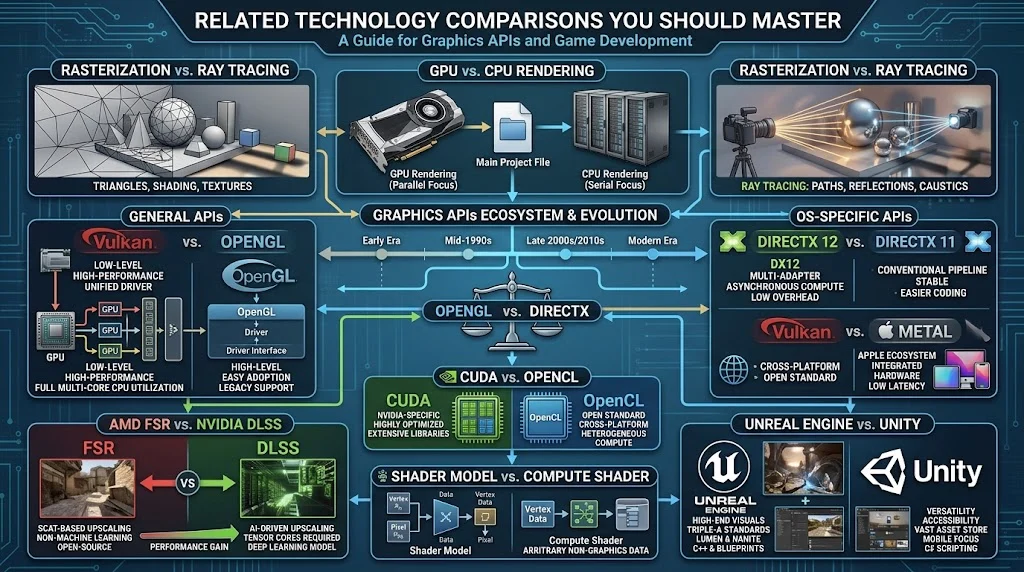
If you are learning about graphics APIs and game development, these related topics can deepen your understanding.
- Vulkan vs OpenGL
- DirectX 11 vs DirectX 12
- Vulkan vs Metal
- OpenGL vs DirectX
- CUDA vs OpenCL
- Ray tracing vs Rasterization
- AMD FSR vs NVIDIA DLSS
- Unreal Engine vs Unity
- Shader Model vs Compute Shader
- GPU vs CPU Rendering
These comparisons explain how modern graphics technologies work together and help developers choose the right tools for different platforms and workloads.
FAQs
Is Vulkan better than DX12 for gaming?
It depends on the game and your hardware. Some titles are optimized for Vulkan, while others achieve better performance with DirectX 12 on Windows.
Should I choose Vulkan or DX12 for game development?
Choose Vulkan if you need cross platform support. Choose DirectX 12 if your project targets only Windows and Xbox devices.
Can Vulkan and DX12 be used in the same game?
Yes. Many modern games include both APIs and allow players to select the one that performs best on their system.
Why do some games run better with Vulkan?
Vulkan reduces CPU overhead and offers excellent multithreading capabilities. Games specifically optimized for it can achieve smoother performance.
Is DirectX 12 only available on Windows?
Yes. DirectX 12 is designed for Microsoft Windows and Xbox platforms and is not supported on Linux or Android.
Do I need a special graphics card for Vulkan?
Most modern AMD, NVIDIA, and Intel graphics cards support Vulkan, although supported features vary by hardware generation.
Which API is easier to learn for beginners?
DirectX 12 is generally easier for developers already working in the Windows ecosystem, while Vulkan has a steeper learning curve because it exposes more low level controls.
Conclusion
Choosing between vulkan or dx12 is less about finding a universal winner and more about selecting the graphics API that matches your goals. Vulkan excels in cross platform development, making it an excellent choice for applications targeting Windows, Linux, Android, Steam Deck, and other supported systems. Its open standard and flexible architecture allow developers to build software that reaches a wider audience without relying on a single operating system.
DirectX 12, on the other hand, remains the leading option for Windows and Xbox development. Its close integration with Microsoft’s ecosystem, mature development tools, and extensive support from commercial game studios make it a natural fit for many AAA games and professional graphics applications.
For software engineers, the decision should be based on target platforms, available resources, long term maintenance, and compatibility requirements rather than benchmark numbers alone.
Understanding the strengths and limitations of both APIs allows you to make smarter decisions you are building games, evaluating graphics performance, or simply choosing the best settings for your favorite titles.
Discover More Related Articles:
- Geez or Jeez | What Is the Difference & Which One Should You Use In 2026
- Grammer or Grammar | Which Spelling Is Correct & Why It Matters In 2026
- Forgo or Forego | The Small Spelling Difference That Changes Meaning In 2026