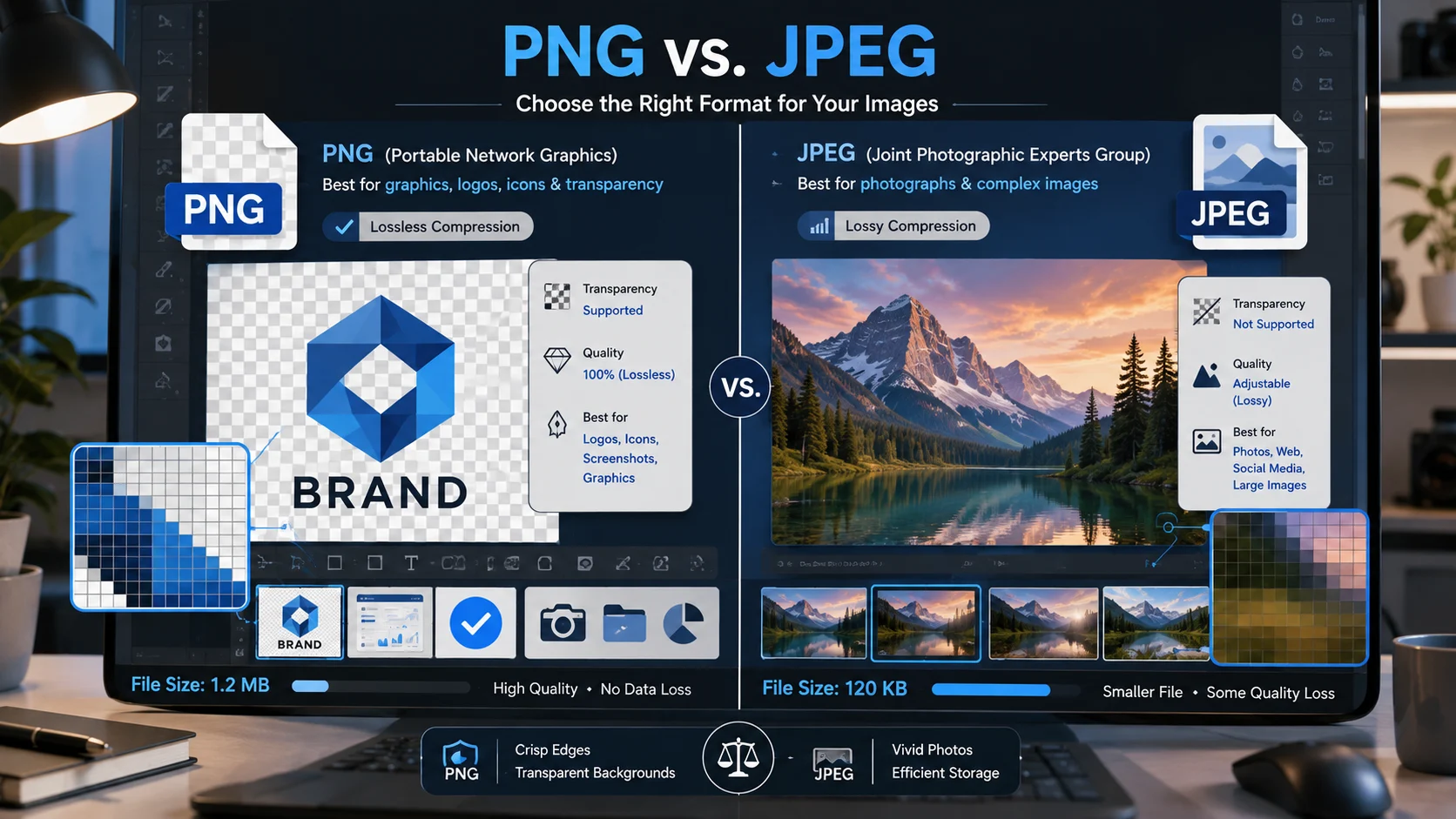
PNG and JPEG are both popular image formats, but they serve different purposes. PNG preserves image quality and supports transparent backgrounds, while JPEG creates smaller files by compressing visual data, making it better suited to photographs, websites, and situations where storage or loading speed matters.
PNG or JPEG | What’s the Difference?
The choice between PNG and JPEG is mainly a question of image content, quality requirements, transparency, and file size. Neither format is universally better. The right option depends on what the image contains and how you plan to use it.
PNG is a noun referring to Portable Network Graphics, a raster image format designed for lossless compression. It preserves the original pixel information more accurately and supports transparency, making it especially useful for logos, icons, screenshots, illustrations, diagrams, and graphics containing text.
JPEG is a noun referring to the Joint Photographic Experts Group, the organization associated with the image standard commonly represented by the .jpg or .jpeg file extension. JPEG uses lossy compression, which reduces file size by discarding some visual information.
| Feature | PNG | JPEG |
|---|---|---|
| Compression | Lossless | Lossy |
| Image quality | Preserves pixel information | Some data is discarded |
| Transparency | Supported | Not supported |
| Typical file size | Usually larger | Usually smaller |
| Best for | Logos, graphics, screenshots, text | Photos and realistic images |
| Repeated editing | Better choice | Quality can degrade |
| Web photography | Often unnecessary | Excellent choice |
| Sharp text and lines | Excellent | May create artifacts |
| Color handling | Strong for graphics | Strong for photographs |
| Common extensions | .png | .jpg, .jpeg |
The simplest distinction is this:
PNG is generally better for graphics that need clarity and transparency.
JPEG is generally better for photographs that need a smaller file size.
A logo with a transparent background is usually a strong PNG candidate.
A holiday photograph is usually better saved as JPEG.
Is PNG or JPEG a Grammar, Vocabulary or Usage Issue?
The difference between these terms isn’t a grammar issue. It is a technology and usage distinction involving two different image formats.
You can mention both formats in the same sentence, but they aren’t interchangeable when you’re choosing how an image should be stored. Saying that an image is “a PNG” identifies its file format. Saying that an image is “a JPEG” identifies a different format with different compression characteristics.
In formal writing, technical documentation, academic work, and professional communication, both terms are acceptable. Their capitalization is also commonly written as PNG and JPEG because they originate as technical names and acronyms.
In casual conversation, people may simply say “image,” “picture,” “photo,” or “file.” That doesn’t eliminate the technical distinction. A designer, developer, photographer, or website administrator may need to know the exact format because it affects quality, transparency, compatibility, and file size.
The important point is that these aren’t alternative spellings of the same word. They describe different technologies designed for different types of visual content.
What Is a PNG File?
A PNG file is a raster image that uses lossless compression. When a PNG image is saved and reopened, the compression process doesn’t intentionally remove image data to make the file smaller.
This makes PNG particularly valuable when precision matters.
Consider a company logo containing thin lines, small lettering, and a transparent background. Saving that logo as PNG can preserve clean edges while allowing the design to sit naturally on different backgrounds.
PNG is also widely used for screenshots. Computer screenshots often contain interface elements, text, sharp borders, icons, and areas of solid color. Lossy compression can introduce small visual artifacts around these details, whereas PNG is well suited to preserving them.
PNG Workplace Example
Imagine a marketing team preparing a company logo for a presentation, website, or digital advertisement. The logo needs to appear over different background colors without showing a rectangular white box around it.
PNG is a practical choice because transparency can be preserved.
A designer can create a logo with transparent areas and deliver it as a PNG file. The same file can then be placed over a dark presentation slide, a colored website section, or another visual background.
PNG Academic Example
Students, teachers, researchers, and technical writers frequently work with charts, diagrams, screenshots, and mathematical illustrations.
Suppose a research report contains a detailed flowchart with small labels. A PNG can preserve the sharp edges and readable text more effectively than a heavily compressed photographic format.
For screenshots of software interfaces, laboratory equipment, diagrams, or digital charts, PNG is often an appropriate option.
PNG Technology Example
PNG is common in software interfaces and digital design. Developers may use PNG files for interface elements, icons, game assets, diagrams, and other graphics where transparent pixels are useful.
It can also be useful when an image must retain exact visual information through multiple stages of editing.
PNG usage recap: Choose PNG when transparency, sharp edges, text, screenshots, or lossless quality are more important than achieving the smallest possible file.
What Is a JPEG File?
JPEG is a raster image format designed to store photographic and other continuous tone images efficiently. Its defining feature is lossy compression.
Lossy compression means that some visual information is removed during compression. The advantage is a substantial reduction in file size. At reasonable quality settings, the difference may be difficult for the human eye to notice.
That’s why JPEG became so important for digital photography and the web.
Photographs contain enormous amounts of color variation and subtle detail. A modern camera can produce an image containing millions of pixels, and storing every pixel without compression can result in a large file.
JPEG compression makes those images considerably easier to store, transmit, and display.
JPEG Workplace Example
Imagine an organization publishing employee portraits on its website. The images don’t require transparency, but they need to load quickly for visitors.
JPEG is often the practical choice because photographs can be compressed to significantly smaller file sizes while retaining good visual quality.
This can reduce storage requirements and improve page loading performance.
JPEG Academic Example
A student preparing a report about architecture, geography, history, travel, or biology may need to include several photographs.
Using JPEG can keep the document or collection from becoming unnecessarily large. When the images are primarily photographs rather than diagrams containing fine text, JPEG compression is often suitable.
JPEG Technology Example
Websites, digital cameras, mobile devices, image editors, and content management systems commonly support JPEG.
A photography website might contain hundreds or thousands of images. Keeping every photograph as a large lossless file could create substantial storage and bandwidth requirements.
JPEG provides a useful compromise between visual quality and manageable file size.
JPEG usage recap: Choose JPEG when the image is primarily photographic, transparency isn’t needed, and reducing file size is an important consideration.
When You Should NOT Use PNG or JPEG
Knowing when not to use a format is just as important as knowing when to use it.
| Situation | Avoid | Better choice | Reason |
|---|---|---|---|
| Transparent logo | JPEG | PNG | JPEG doesn’t support transparency |
| Large photograph | PNG | JPEG | PNG may create an unnecessarily large file |
| Screenshot with text | JPEG | PNG | PNG keeps sharp text and interface edges |
| Simple web icon | JPEG | PNG or another suitable modern format | JPEG compression can create artifacts |
| Repeated JPEG editing | JPEG | PNG or source format | Repeated lossy saves can reduce quality |
| Professional photograph | PNG by default | JPEG or suitable photographic format | JPEG can provide much smaller files |
| Diagram with fine lines | JPEG | PNG | Lossless compression protects detail |
| Image needing very small size | PNG | JPEG or suitable modern format | PNG may be larger |
You shouldn’t automatically select PNG just because it offers higher fidelity. A high resolution photograph saved as PNG can become unnecessarily large.
Likewise, you shouldn’t automatically select JPEG simply because it produces smaller files. A screenshot containing tiny text can look noticeably worse after compression.
The best format is determined by the image rather than by a blanket rule about quality.
PNG vs JPEG for Website Performance
Website owners often focus on image file size because images can account for a significant portion of a page’s total transferred data.
JPEG has traditionally been an effective option for photographs because its compression can dramatically reduce the amount of data required.
PNG can be more efficient for certain graphics, particularly when the image contains large areas of uniform color, sharp edges, text, or transparency.
However, modern websites have additional image formats available, including WebP and AVIF. These can sometimes provide better compression than older formats.
That doesn’t make PNG or JPEG obsolete. Both remain widely supported and useful, particularly when compatibility, editing workflows, existing assets, or specific image characteristics matter.
For a photograph, start by considering JPEG or a modern photographic format.
For a transparent logo or detailed interface graphic, PNG may still be the most convenient choice.
PNG vs JPEG Quality: Which Looks Better?
There isn’t a universal winner because “quality” can mean different things.
PNG preserves image data through lossless compression, so it is particularly strong when exact pixel information matters.
JPEG deliberately removes some information to reduce file size. At high quality settings, the result can look excellent. At very aggressive compression levels, visible artifacts can appear.
JPEG artifacts may show up around sharp edges, text, repetitive patterns, or areas containing fine detail. Photographs often hide compression artifacts better because they contain natural variation.
This is why a JPEG photograph can look excellent even though its underlying data has been compressed substantially.
If you’re evaluating visual quality, don’t look only at the file extension. Consider resolution, compression settings, source quality, viewing size, and the image’s content.
PNG vs JPEG File Size
File size is one of the clearest differences between these formats, but it isn’t an absolute rule.
A photograph saved as PNG can be much larger than the same photograph saved as JPEG.
A simple graphic, however, may compress efficiently as PNG and produce a reasonable file size.
The amount of compression also depends on the image itself. A detailed photograph, a flat illustration, a screenshot, and a logo don’t contain the same type of information.
For this reason, comparing the actual file sizes of the same image in both formats can be more useful than assuming one format will always be smaller.
For websites, email attachments, cloud storage, and mobile sharing, file size can influence convenience and performance.
Common Mistakes and Decision Rules
| Correct sentence | Incorrect sentence | Explanation |
|---|---|---|
| Save the transparent logo as PNG. | Save the transparent logo as JPEG. | JPEG doesn’t support transparency. |
| Use JPEG for the photograph. | Use PNG for every photograph. | JPEG is usually more efficient for photographs. |
| Keep the screenshot as PNG. | Compress every screenshot as JPEG. | PNG generally preserves interface text and edges better. |
| Use JPEG when smaller photographic files are needed. | Use JPEG whenever the highest fidelity is required. | JPEG uses lossy compression. |
| Export the graphic as PNG when sharp edges matter. | Export every graphic as JPEG. | Compression can create artifacts around sharp details. |
Decision Rule: If the image needs transparency, sharp text, crisp graphic edges, or lossless preservation, choose PNG. If it is primarily a photograph and smaller file size matters, choose JPEG.
This rule is simple enough for everyday use while still accounting for the most important technical difference.
PNG and JPEG in Modern Technology and AI Tools
Modern design software, smartphones, websites, artificial intelligence tools, and content management systems commonly encounter both formats.
AI image generators and image editors may accept or produce PNG and JPEG files depending on the platform and workflow. The best format can depend on the resulting image is intended for editing, publication, photography, compositing, or web delivery.
PNG remains especially useful when transparency is part of the workflow. For example, an AI generated object intended to be placed over another design may benefit from a transparent background.
JPEG remains useful when the final image is photographic and the priority is efficient storage or delivery.
AI workflows also make file management more important. Large collections of generated images can quickly consume storage, so choosing an efficient format at the appropriate stage can make a noticeable difference.
PNG and JPEG Etymology and Technical Background
PNG stands for Portable Network Graphics. The format was developed as an open image format and became especially well known for lossless compression and transparency support.
JPEG takes its name from the Joint Photographic Experts Group, a group responsible for developing standards associated with the format. The name is commonly associated with the JPEG image compression standard.
The .jpg and .jpeg extensions generally refer to the same JPEG family of image files. The difference between the extensions doesn’t mean that one is inherently higher quality than the other.
“The best image format is determined by the characteristics of the image and the purpose for which it will be used.”
That principle is more useful than treating one format as universally superior.
Real World Case Studies
Case Study 1: Transparent Brand Assets
Consider a business preparing its logo for use across a website, presentation, social media graphic, and digital advertisement.
The logo may contain transparent areas and sharp typography. Saving it as JPEG would introduce a solid background because JPEG doesn’t provide an alpha transparency channel.
A PNG version allows the same logo to be placed over different backgrounds while retaining crisp edges. The practical result is a single flexible brand asset that can be reused across multiple designs.
Case Study 2: Online Photography
Now consider a website containing hundreds of product photographs.
If every photograph were stored as a large lossless image, the site’s image library could require substantially more storage. Visitors would also need to download larger files.
Using appropriately compressed JPEG images can reduce individual file sizes while maintaining visually convincing photographs. The practical result is a more manageable image library and more efficient delivery.
These examples show why the question isn’t simply about which format has better quality. The real question is what the image needs to accomplish.
Error Prevention Checklist
Always Use PNG When
The image needs transparency.
The image contains sharp text.
☐ The image is a screenshot.
The graphic contains diagrams or precise lines.
Lossless preservation is important.
☐ The asset is a logo or interface graphic.
Never Use JPEG When
☐ You need transparent pixels.
☐ Tiny text must remain extremely sharp.
The image will repeatedly be saved with lossy compression.
The graphic contains delicate hard edges that compression could damage.
☐ You need a lossless copy of the original raster artwork.
These aren’t absolute laws for every professional workflow, but they’re reliable practical rules for everyday image selection.
How to Choose the Right Image Format
Start with the image itself.
If you’re working with a photograph, JPEG is usually an efficient starting point. Adjust the quality setting according to the intended use. A high quality original intended for printing may need different treatment from a small photograph displayed on a website.
If you’re working with a logo, icon, screenshot, diagram, or transparent graphic, PNG is often more appropriate.
Next, consider where the file will be used.
A website may prioritize download size. A design archive may prioritize editing flexibility. A presentation may need transparency. A technical report may need sharp text.
Finally, consider a newer image format is appropriate. WebP and AVIF can provide useful alternatives for modern websites, although PNG and JPEG remain valuable because of their broad support and established workflows.
Related Grammar Confusions You Should Master
Understanding image formats is different from learning grammar, but English users frequently encounter technical terms that can be confused with ordinary vocabulary.
Related language distinctions worth mastering include:
- JPEG and JPG: These usually refer to the same JPEG image family.
- PNG and SVG: PNG is a raster format, while SVG is designed for scalable vector graphics.
- Image and photo: An image can be a photograph, illustration, screenshot, diagram, or other visual.
- Resolution and file size: A higher resolution doesn’t automatically mean a better optimized file.
- Compression and resizing: Compression changes how image data is stored, while resizing changes the image dimensions.
- Lossless and lossy: Lossless compression preserves the relevant original data, while lossy compression removes some information.
- Pixel and vector: Pixels make up raster images, while vector graphics use mathematical descriptions of shapes.
- Quality and resolution: Increasing resolution doesn’t automatically restore missing image detail.
- Format and extension: A file extension identifies how a file is commonly represented, while the underlying format defines how its data is structured.
- Transparency and background removal: Transparency is a property of the image data, while background removal is an editing process.
FAQs
Is PNG or JPEG better for photos?
JPEG is usually better for photographs because its lossy compression can create much smaller files while maintaining good visual quality.
Is PNG or JPEG better for logos?
PNG is generally better for logos when sharp edges or transparent backgrounds are required.
Does JPEG support transparency?
No. JPEG does not provide the transparency capability commonly available in PNG.
Does PNG lose image quality?
PNG uses lossless compression, so saving an image as PNG doesn’t intentionally discard image information through lossy compression.
Why are JPEG files smaller than PNG files?
JPEG uses lossy compression that removes some visual information, allowing many photographs to be stored using substantially less data.
Should screenshots be PNG or JPEG?
PNG is usually preferable for screenshots containing text, icons, sharp borders, and interface elements because it preserves those details well.
Can I convert JPEG to PNG?
Yes, but converting a JPEG to PNG won’t restore information that was already lost during JPEG compression.
Can I convert PNG to JPEG?
Yes, but transparency will not be retained, and the resulting JPEG will use lossy compression.
Are JPG and JPEG the same thing?
In normal usage, JPG and JPEG refer to the same image format. The difference is primarily the filename extension.
Conclusion
Choosing between PNG and JPEG doesn’t have to be complicated. Focus on the image’s content, the required quality, transparency, file size, and intended destination.
Use PNG for logos, screenshots, diagrams, transparent graphics, and images where lossless preservation matters. Use JPEG for photographs and other realistic images when efficient file size is important.
The most useful rule is simple: preserve detail with PNG when precision matters, and use JPEG when photographic compression provides a practical balance between quality and size.
Understanding png or jpeg is ultimately less about declaring a winner and more about matching the format to the job. Once you understand compression, transparency, image quality, and file size, choosing the right format becomes straightforward.
Discover More Related Articles:
- Pimple or Herpes | How to Tell the Difference & When to Get Medical Advice In 2026
- Cetaphil or CeraVe | Which Is Better for Your Skin Type In 2026
- Innie or Outie | Meaning, Difference & Usage Explained In 2026